 All-in-One COB LED TV
  Flexible LED Displays
  Transparent LED Displays
  Led Poster
  Circular LED Displays
  Creative & Custom LED Displays
 Indoor LED display technology has come a long way in recent years. Among the most impressive is the P1.2 LED display. They offer ultra-fine pixel pitch and exceptional image clarity. In this article, we’ll explore P1.2 LED displays detail.
What is a P1.2 LED Display?

A P1.2 LED display refers to an ultra-fine 1.25mm pixel pitch LED screen. Its distance between each pixel is just 1.25 millimeters. This incredibly tight spacing results in a pixel density of approximately 640,000 pixels per square meter, which allows the screen to deliver stunning image detail even at close viewing distances. Moreover, P1.2 LED wall displays typically offer brightness levels ranging from 600 to 1000 nits. Therefore, They are perfect for environments like control rooms, boardrooms, and high-end retail spaces.
In terms of performance, they also has a high refresh rate of 3840Hz or more, flicker-free video playback and seamless motion rendering. The contrast ratio generally exceeds 5000:1, providing rich blacks and vibrant color depth.
Common P1.2 LED Display Packaging Technologies
To achieve such fine pitch and image quality, LED manufacturers use advanced LED packaging methods. P1.2 displays mainly use two packaing technologies.
COB Packaging:

COB technology directly mounts bare LED chips onto the display module’s PCB substrate. They are then covered with a protective phosphor layer and encapsulant in a single process, forming a unified, smooth surface.
COB LEDs typically feature smaller individual chip sizes. They offer excellent thermal management as heat dissipates directly through the PCB.
Key specs include
- high reliability ,
- lower operating temperatures,
- inherent protection against physical damage moisture ingress
- IP54 or higher achievable without front mask.
Advantages:
- Superior Durability: Highly resistant to physical impact, scratches, and pixel damage.
- Excellent Viewing Experience: Seamless, smooth surface reduces glare and minimizes moiré patterns with camera lenses.
- Enhanced Reliability: Better heat dissipation and protection against dust/moisture.
- Wider Viewing Angles: Achieves near-180° H/V angles.
- Lower Maintenance: Fewer dead pixels and less prone to damage during cleaning.
Disadvantages:
- Higher Initial Cost: Manufacturing process is more complex and expensive.
- Repair Complexity: Fixing individual failed chips is extremely difficult; usually requires replacing the entire module.
- Potential Color Consistency Challenges: Achieving perfect color uniformity across the entire encapsulated area during manufacturing requires high precision.
4-in-1 SMD Packaging:
This technology clusters four individual miniature RGB LED chips into a single, compact surface-mountable package. These packages are then soldered onto the PCB like traditional SMDs, but at a much smaller scale. 4 in-1 packages are significantly smaller than traditional SMD 1010 or 0808 lamps.
- Key specs
- high brightness output
- good color mixing within the package
- and relatively mature manufacturing processes.
- They often utilize black epoxy for improved contrast.
Advantages:
- Lower Cost: More mature technology and manufacturing process generally makes them cheaper than COB.
- Easier Repairability: Individual failed lamp packages can be replaced using specialized hot air rework stations.
- Mature Supply Chain: available components and established production lines.
- Good Performance: high brightness and color quality.
Disadvantages:
- Higher Risk of Physical Damage: Individual lamps are exposed and can be knocked off during handling or cleaning.
- Potential for Dead Pixels: a single lamp Failure results in a dead pixel or sub-pixel.
- Surface Texture: The discrete lamps create a slightly textured surface, which can sometimes cause glare or minor moiré with cameras.
- Moisture/Dust Sensitivity: Requires careful sealing to achieve protection levels comparable to COB.
Common P1.2 LED Displays Specifications
Below is a typical list of P1.2 LED display specs ,Which is used across commercial and professional-grade projects:
| Specification | Typical Value |
|---|---|
| Pixel Pitch | 1.25mm |
| LED Type | SMD1010 / COB |
| Brightness | 600–1000 nits |
| Pixel Density | ~640,000 pixels/m² |
| Panel Size | 600 × 337.5 mm |
| Refresh Rate | ≥3840Hz |
| Gray Scale | 14–16 bit |
| Viewing Angle | 160° (H/V) |
| Contrast Ratio | 5000:1 – 10000:1 |
| Input Voltage | AC 100–240V |
| Cabinet Material | Die-cast aluminum |
Where is P1.2 LED wall Commonly Used?
Control Rooms and Command Centers
In mission-critical environments, like control rooms, They need 24/7 performance and visual accuracy. P1.2 LED displays deliver high-resolution imagery and real-time data visualization. Their ultra-low latency and wide viewing angle make all operators see the same accurate content without distortion.
Boardrooms and Corporate Lobbies
Due to sleek look and stunning clarity, premium boardrooms and executive meeting rooms will benefit from P1.2 displays. In lobbies, P1.2 video displays offer an impressive branding canvas with dynamic visual storytelling.
Broadcast Studios and Virtual Production
With high refresh rates and flicker-free visuals, P1.2 LED walls are ideal for live video shooting environments. They integrate well with virtual production pipelines and green screen replacements, whih can provide immersive backgrounds and adaptable stage visuals.
How Much Area and Cabinets to Build a 4K P1.2 Video Wall?
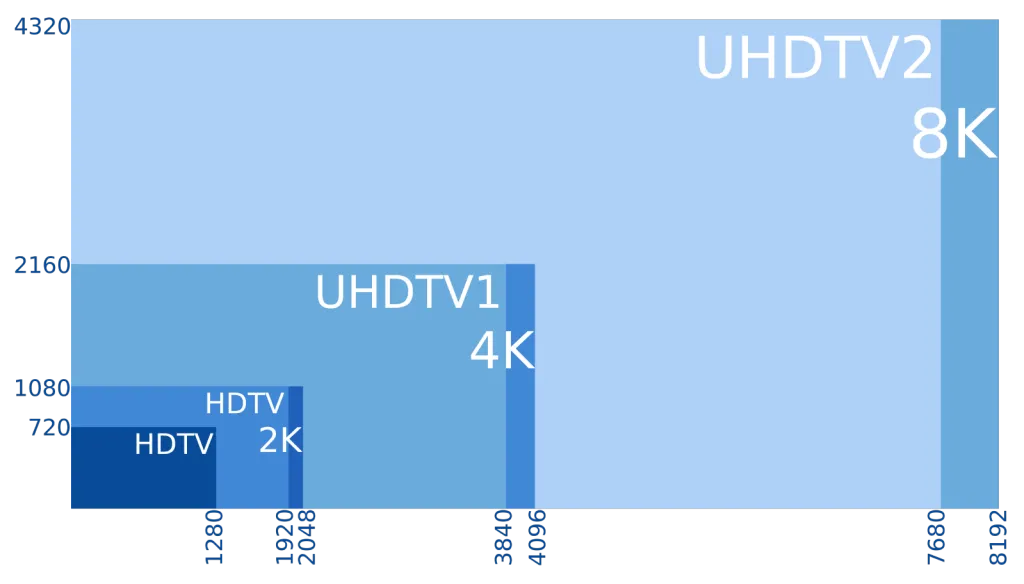
So, you want to use P1.2 LED to build stunning 4K video wall ? Let’s calculate exactly what that requires. We’ll assume we’re using cabinets with dimensions of 600mm (W) x 337.5mm (H).
Understand 4K Resolution: True 4K UHD resolution is 3840 pixels wide by 2160 pixels high.
Calculate Pixels per Cabinet:
Pixel Pitch = 1.2mm
Cabinet Width = 600mm
Cabinet Height = 337.5mm
- Horizontal Pixels per Cabinet = Cabinet Width / Pixel Pitch = 600mm / 1.2mm = 500 pixels
- Vertical Pixels per Cabinet = Cabinet Height / Pixel Pitch = 337.5mm / 1.2mm = 281.25 pixels
Important: LED cabinets must contain whole pixels. 281.25 is not possible. Therefore, the actual vertical resolution per cabinet must be rounded. Typically, LED display manufacturers design cabinets to hold 281 vertical pixels in this size (337.5mm / 1.2mm ≈ 281.25, rounded down to 281px). Always confirm the exact resolution of the specific cabinet.
Cabinet Resolution: 500 (W) x 281 (H) pixels.
Calculate Number of Cabinets Needed:
Total Horizontal Pixels Needed: 3840
Cabinets Wide = Total Horizontal Pixels / Pixels per Cabinet Width = 3840 / 500 = 7.68
Since you need whole cabinets, you must round up to 8 cabinets wide. (7 cabinets would only give 7*500=3500px < 3840px).
Total Vertical Pixels Needed: 2160
Cabinets High = Total Vertical Pixels / Pixels per Cabinet Height = 2160 / 281 ≈ 7.687
Round up to 8 cabinets high. (7 cabinets would give 7*281=1967px < 2160px).
Total Cabinets = Cabinets Wide x Cabinets High = 8 x 8 = 64 cabinets.
Calculate Total Screen Resolution:
- Actual Horizontal Pixels = Cabinets Wide * Pixels per Cab Width = 8 * 500 = 4000 pixels
- Actual Vertical Pixels = Cabinets High * Pixels per Cab Height = 8 * 281 = 2248 pixels
This achieves a resolution of 4000×2248, which is slightly larger than standard 4K UHD (3840×2160). Consequently, content will be displayed natively without downscaling, utilizing the full screen. You will need a video processor to handle this custom resolution or mapping 4K content appropriately.
- Screen Width = Cabinets Wide * Cabinet Width = 8 * 0.6m = 4.8 meters
- Screen Height = Cabinets High * Cabinet Height = 8 * 0.3375m = 2.7 meters
- Total Screen Area = Screen Width x Screen Height = 4.8m * 2.7m = 12.96 square meters
- Total Screen Area ≈ 13 m²
Therefore, to build a 4K video wall, you need 64 cabinets arranged in an 8×8 grid, resulting in a screen size of 4.8m wide by 2.7m high (approximately 13 m²).
Doitvision’s P1.2 LED Display Solutions
At Doitvision, we offer a variety of P1.2 LED display for premium applications:
COB Pro Series

High-end COB-based panels with anti-collision surfaces and ultra-black contrast. It is Ideal for control rooms and high-traffic areas.
COB Poster Series

Freestanding LED posters using P1.2 COB technology. It is perfect for malls, exhibitions, and museums.
Auto Lift & Fold COB Series

With motorized folding and liftingdesign ,they are Smart movable LED screen solution. It has .It is ideal for flexible installations and premium showrooms.
Each series comes with advanced features like:
- 4K/8K ready configurations
- Front maintenance
- Ultra-lightweight aluminum cabinets
- Seamless splicing and HDR compatibility
How Much Does a P1.2 LED Display Cost?
The P1.2 LED display price varies significantly based on several key factors. We can expect a starting range of approximately $1,500 to $2,500 USD per square meter.
General Price Range:
- P1.2 SMD 4-in-1: $1,200–$1,600 per square meter
- P1.2 COB: $1,500–$2,200 per square meter
By LED Chip Brand and Packaging:
By LED Chip Brand and Packaging:
| LED Brand | Packaging Type | Price (USD/m²) |
|---|---|---|
| Nationstar | SMD 4-in-1 | $1,300–$1,600 |
| Nationstar | COB | $1,700–$2,100 |
| Kinglight | SMD 4-in-1 | $1,200–$1,500 |
| Kinglight | COB | $1,500–$1,900 |
| Refond | COB | $1,600–$2,200 |
| San’an | SMD 4-in-1 | $1,250–$1,550 |
Accessories & Services:
- Mounting structure (fixed, mobile, lift & fold)
- Video processors and controllers
- Content management system (CMS) software
- Professional installation and calibration services
- Extended warranty
Please note: Prices exclude control systems, installation, and shipping. For an accurate quote, you can contact a professional LED solution provider like Doitvision.
Conclusion
P1.2 LED displays represent a new standard for indoor fine-pitch visual excellence. If you’re building a 4K control wall or enhancing a brand environment, P1.2 panels offer precision, clarity, and flexibility. At Doitvision, we can help you choose the right P1.2 solution according to your space and budget. you can contact us to get professional solution.