All-in-One COB LED TV
  Flexible LED Displays
  Transparent LED Displays
  Led Poster
  Circular LED Displays
  Column LED Screens
  Creative & Custom LED Displays
 LED display ghosting is unwanted light from pixels that should be off. Dead-pixel crosses and low-gray color shift can involve different faults or drive behavior. Start with a reproducible test pattern, then check the module topology and operating settings before changing voltages.
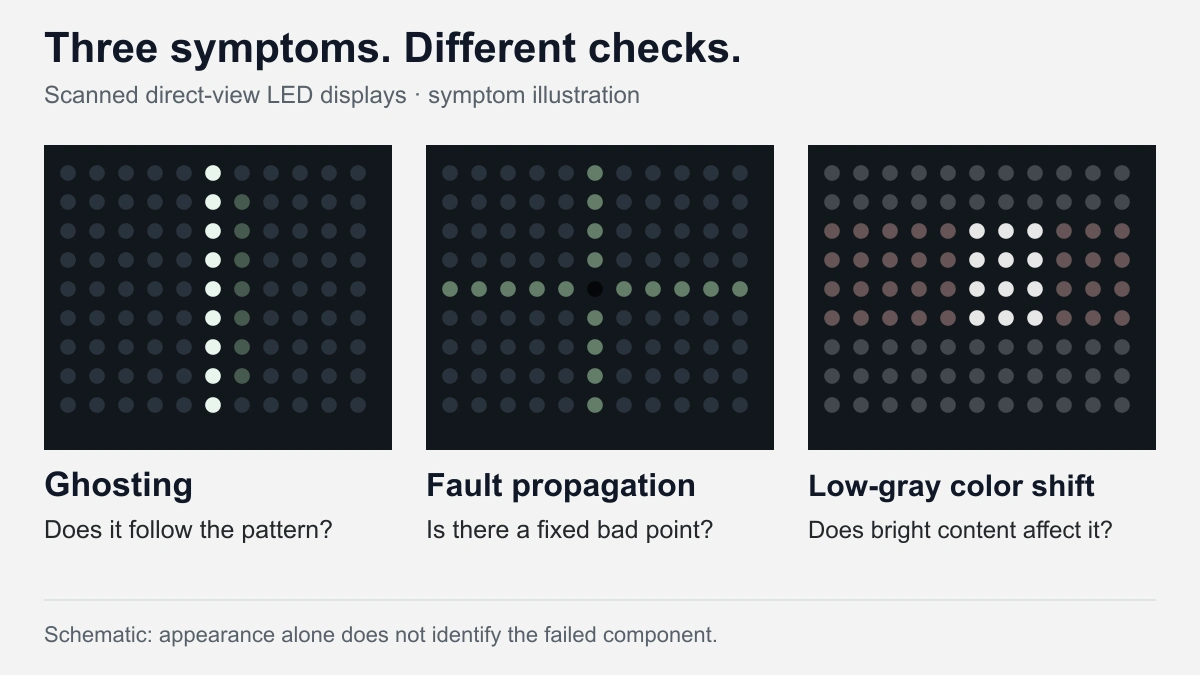
Record where the artifact appears, the image that triggers it and the display configuration before changing settings. Check it with your eyes as well as a camera. A fixed dark point, a content-dependent cross and camera-only bands call for different investigations. For purchasing, ask the supplier to reproduce the proposed configuration at the brightness and with the content your project will use.
Identify the symptom before changing settings
Stored charge and row-switching timing can create ghosting; a failed LED can disturb neighboring pixels through shared paths. Low-gray color shift can also expose differences in RGB response or coupling between bright and dark content. A photograph of a cross or a bright line is insufficient to identify a failed component. First establish whether the artifact stays at the same physical location, follows the picture, or appears only through the camera. The observations below narrow the investigation; they are not component-level diagnoses.
| What you observe | What to compare | Next check |
|---|---|---|
| Faint light next to bright pixels | Move a thin line across a black background | Record whether the unwanted light follows the line and changes with brightness |
| A fixed dark or incorrectly colored point | Show separate red, green and blue fields | Record which color channel and physical position are affected |
| A cross or bright row/column near a bad point | Change the content at and around that point | Check LED fault detection and the module circuit with the supplier |
| Tint or uneven dark areas | Compare a neutral ramp with and without a bright patch | Separate general low-gray response from content-dependent coupling |
| Bands or patterns visible only in a recording | Compare direct viewing and several camera settings | Investigate camera/display timing or spatial sampling before condemning a module |
Map the affected position to a cabinet and module. Note whether it crosses a module boundary. If the symptom began after a replacement or configuration change, retain both the previous settings and the replacement part identification. That history is more useful than an isolated close-up.
Reproduce the fault with controlled test patterns
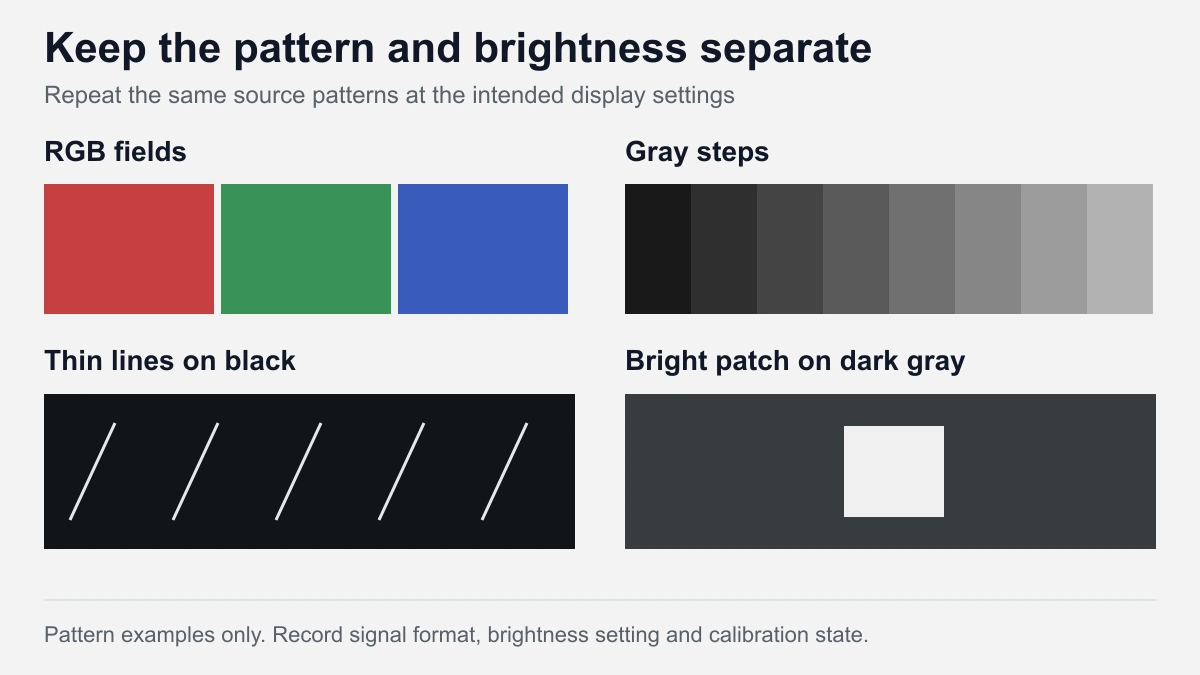
Start with the current working configuration and save it. Use a known source at the screen's mapped resolution where possible; scaling can alter thin lines. Keep signal range, processing mode and calibration state consistent during comparisons. Change one variable at a time and keep a record of the result.
- Show full red, green and blue fields to identify fixed points and color-specific behavior.
- Show black with thin horizontal, vertical and diagonal lines to reveal unwanted neighboring light.
- Show neutral gray steps and a dark ramp, then repeat at the intended dimmed operating setting.
- Add and remove a bright patch on a dark-gray field. Observe whether nearby rows or columns change with it.
- Finish with representative slides, graphics and video from the actual project.
Record both the content level and the display brightness setting. A dark image on a bright screen and the same image on a dimmed screen are different test conditions. If a meter is used, record the measured luminance as well as the controller setting.
For camera evidence, keep exposure and white balance fixed during a before/after comparison. Include a whole-module view and a close-up, with the source pattern visible in the record. If the problem is camera-only, record frame rate, shutter setting and camera position. A change caused by camera settings is a useful clue; it does not by itself prove that the screen is fault-free for the intended filming use.
Why scanning LED displays produce ghosting
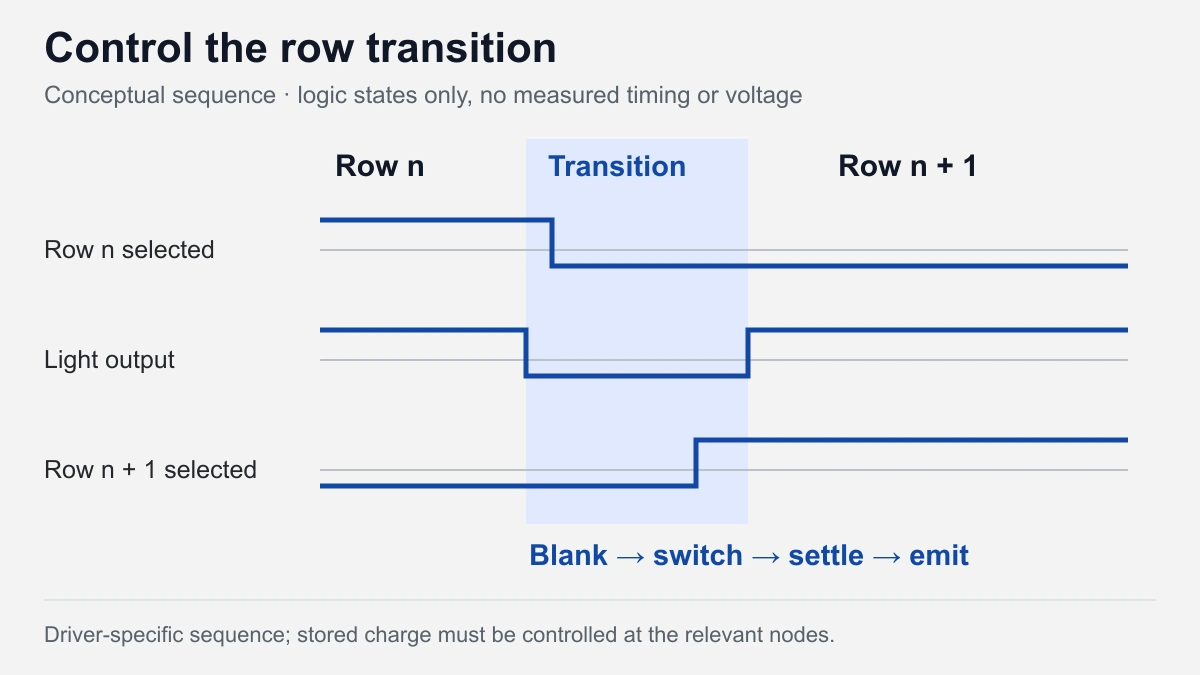
Scanned modules share drive resources between groups of LEDs. During a row transition, the selected row and column outputs change state. Parasitic capacitance stores charge on these connections; unintended charging or discharging through an LED can briefly illuminate it. Row and column effects can produce different ghost positions. TI separates these mechanisms in its matrix display application report, section 3.1.
The switching interval matters
A simplified sequence is: suppress light output, switch the selected row, allow the relevant nodes to settle, then resume the intended output. The actual overlap, polarity and timing are driver-specific. Blanking is the interval used to suppress unwanted emission around a transition; it is not the same thing as video frame rate.
Charge-control circuits may discharge or clamp a node, or precharge it to a defined level. Their names alone do not tell you which node is controlled. For example, the TLC5958 application report, section 3.12 describes precharge at the output channels. That is a device example, not a universal row-voltage setting.
Ask the engineer to identify the relevant node and the supported driver feature. Compare the result using the same test pattern after each adjustment. If a change removes the visible halo, repeat the gray-ramp and high-contrast checks before accepting the new configuration.
How an open or shorted LED can affect nearby pixels
An open LED interrupts its intended current path. A shorted LED creates an unintended connection between its terminals. In a multiplexed matrix, either fault can affect shared electrical paths; the surrounding artifact depends on the circuit and its fault-handling features.
Terms such as “cross” and “caterpillar” describe appearance, and manufacturers do not always use them identically. TI's TLC694x reference manual, section 2.3.2.4 describes an open-LED caterpillar mechanism: a pulled-down output and stored charge can illuminate LEDs on an unselected line. It also describes a device-specific suppression function. A caterpillar pattern therefore cannot be treated as proof of an LED short circuit.
Detection, isolation and repair are separate steps
Detection identifies a fault condition. Isolation or suppression reduces its effect on other pixels. Repair restores the failed part or replaces the affected assembly. An apparently clean surrounding image after enabling suppression does not establish that the original LED is functional.
Have the service team compare the reported location against the driver diagnostics and the module design. Retest the affected color channel after repair, then repeat the original triggering pattern. Connector, solder, output-channel and configuration problems can require different actions even when the visible symptoms overlap. Perform module replacement under the manufacturer's power-isolation and handling procedure; do not improvise live connector swaps.

Why low-gray color and high-contrast patterns expose problems
Low grayscale describes dark content values. Low brightness describes a dimmed display operating condition. A screen may need to handle both simultaneously. PWM drivers vary emission timing, so a low gray value does not necessarily mean that the instantaneous LED current is proportionally smaller. The TLC5958 report documents PWM control and a separate low-grayscale enhancement function.
Separate uniformity from content-dependent coupling
Compare a plain dark-gray field with the same field containing a bright patch. If the nearby area changes when the patch appears or moves, investigate content-dependent interaction. TI discusses both brighter and darker coupling in SLVAFM7, section 3.2. If the tint remains across a uniform field, widen the investigation to RGB response, settings and calibration rather than assigning it to that one mechanism.
Before changing the module drive, compare the source signal and processor settings with a known configuration. A compressed video or incorrectly interpreted signal range can obscure the distinction between source content and display behavior. Keep the same input path when comparing samples.
For a control room, include fine text, status colors and dark interface backgrounds. For events, include fades, dark stage backgrounds and camera tests when filming is part of the brief. Evaluate the relevant control-room display requirements alongside the pattern tests. A successful full-white demonstration covers only one operating condition.
What engineers must verify before changing drive voltages
The off-state behavior depends on voltage across the LED, not a single node measured without context. Define V_A as anode potential and V_K as cathode potential: V_LED = V_A − V_K. Positive values indicate forward polarity; negative values indicate reverse polarity. Whether appreciable current flows depends on the device characteristics and the complete circuit.
In a simplified common-anode circuit, the selected row supplies the anodes and the column driver sinks current. During emission, the column voltage is approximately the row voltage minus that LED's forward voltage. An unselected row's potential can therefore affect other LEDs sharing the column. This relationship must be re-derived for a different topology or different node definitions.
How forward voltage affects an unselected LED
For that simplified common-anode circuit, let V_S be the selected row potential, V_R the unselected row potential and V_F the forward voltage of the LED that is emitting. The shared column potential is approximately V_K = V_S − V_F. An LED on the unselected row then sees:
V_LED,off = V_R − V_K = V_R − V_S + V_F
At fixed V_S and V_R, a higher V_F at the emitting LED increases the forward-polarity voltage across the unselected LED sharing that column. Whether it emits unwanted light depends on its own current–voltage behavior and the available current path. This simplified node relationship explains why LED selection and row-clamp settings must be evaluated together; it is not a universal setting recommendation.
Forward voltage and reverse stress
LED forward voltage depends on operating conditions and the selected device. A datasheet forward voltage at a specified current should not be treated as a universal threshold below which all faint emission disappears. Check the relevant color channel and actual circuit conditions.
When reviewing reverse stress, measure the anode-to-cathode waveform and compare it with the selected LED manufacturer's permitted conditions. A row clamp value alone does not establish the peak voltage across the LED. Account for transitions and measurement technique when interpreting the waveform.
A useful engineering record includes the LED part, row driver, constant-current driver, supply, scan configuration, brightness/current mode and firmware. It should identify which setting changed, what the waveform or image showed and which checks were repeated. Obtain the supplier's approved settings for that configuration before making changes; there is no defensible universal blanking-voltage prescription for every module.
Recheck the effects of a drive-setting change
A setting that improves one pattern can change another operating condition. Retain the original configuration and compare the following before accepting a revision:
| Setting or feature changed | Intended check | Follow-up check |
|---|---|---|
| Row blanking or charge-control timing | Unwanted light during scan transitions | Low-gray detail and the available emission interval |
| Off-state clamp or precharge level | The relevant node during switching | Actual voltage across selected and unselected LEDs, including reverse stress |
| LED fault detection or suppression | Propagation around a known failed point | The failed color channel after repair; a cleaner surrounding image is not proof of repair |
| Calibration or brightness mode | Neutral gray and RGB response | Dark ramps and bright-on-dark patterns at the intended operating brightness |
What to request in a supplier demonstration and acceptance test
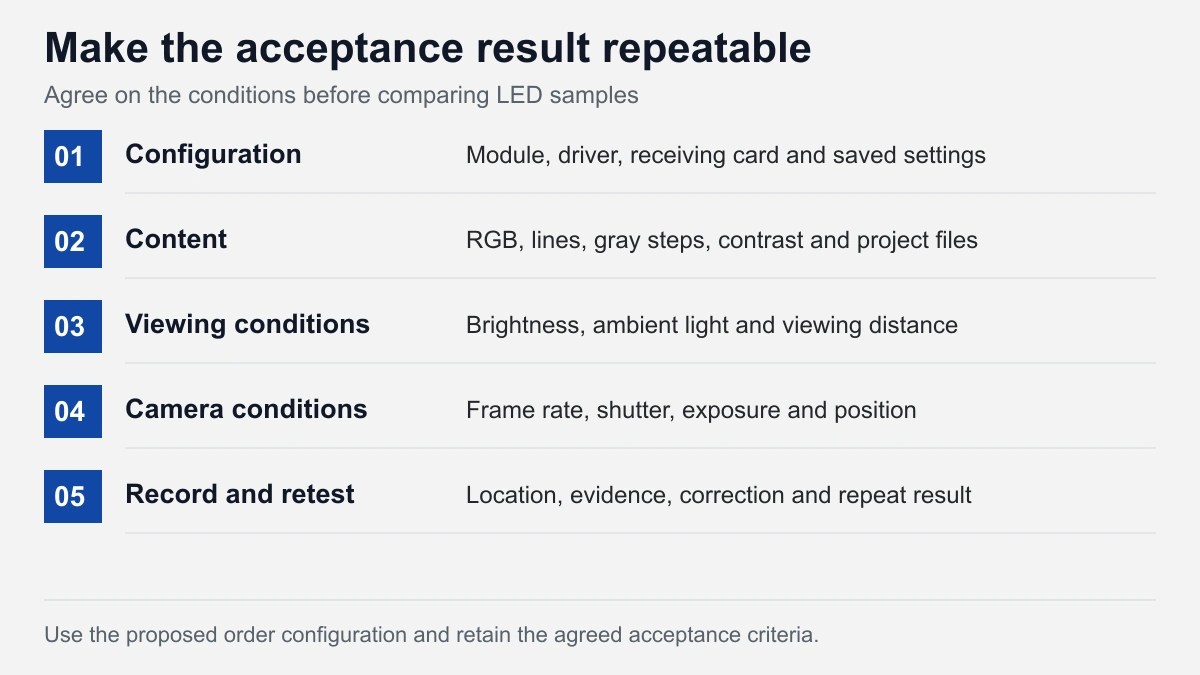
Request the configuration proposed for the order, including the driver and receiving-card settings used for the demonstration. Agree on viewing distance, ambient light, operating brightness and test content before comparing results. When comparing two samples, keep those conditions equivalent and retain their individual configuration records.
| Test | Observation to record | Evidence to retain |
|---|---|---|
| RGB fields | Fixed points and affected colors | Module location and close-up |
| Black with thin lines | Unwanted light around the intended pattern | Pattern file and operating settings |
| Gray steps and dark ramps | Tint, missing steps or uneven regions | Input format, brightness and calibration state |
| Bright patch on dark gray | Changes alongside the patch | Matched images with the patch present and absent |
| Project content and camera test | Text, fades, motion and recording artifacts | Content sample and camera settings where relevant |
Specify how an issue will be recorded, corrected and retested. Put the acceptance criteria in the project agreement, including the treatment of isolated defective pixels and any required camera performance. A supplier's headline refresh-rate or bit-depth figure cannot replace that agreement.
DOIT VISION's QC activities include dead-pixel checks on each module and controller and video-processor testing. Order documentation includes test videos and FAT inspection records. Agree on any project-specific low-gray, high-contrast or camera checks with the team so the evidence matches the order requirements. FAT records document acceptance inspection; they should identify what was actually checked.
Specify the display and the evidence your project needs
For a close-view indoor project, start with the fine-pitch LED display range. Supply wall dimensions, closest viewing distance, content type, room lighting, installation country and schedule. Add the patterns or operating conditions that matter to your application. The proposed configuration and test requirements can then be reviewed together.
If you are reporting an existing fault, include the cabinet/module identification, controller and driver information where available, configuration backup and a reproducible pattern. Mark whether the symptom is fixed, intermittent or camera-only. These records help the engineering team identify the next check and distinguish a service issue from a new display requirement.
Continue your selection
Grayscale and brightness
Definitions and how the two affect LED display selection.
Read the grayscale guide