All-in-One COB LED TV
  Flexible LED Displays
  Transparent LED Displays
  Led Poster
  Circular LED Displays
  Column LED Screens
  Creative & Custom LED Displays
 Grayscale describes intensity steps; brightness describes light output. Both matter when an LED display must reproduce detail at the right level for its surroundings.
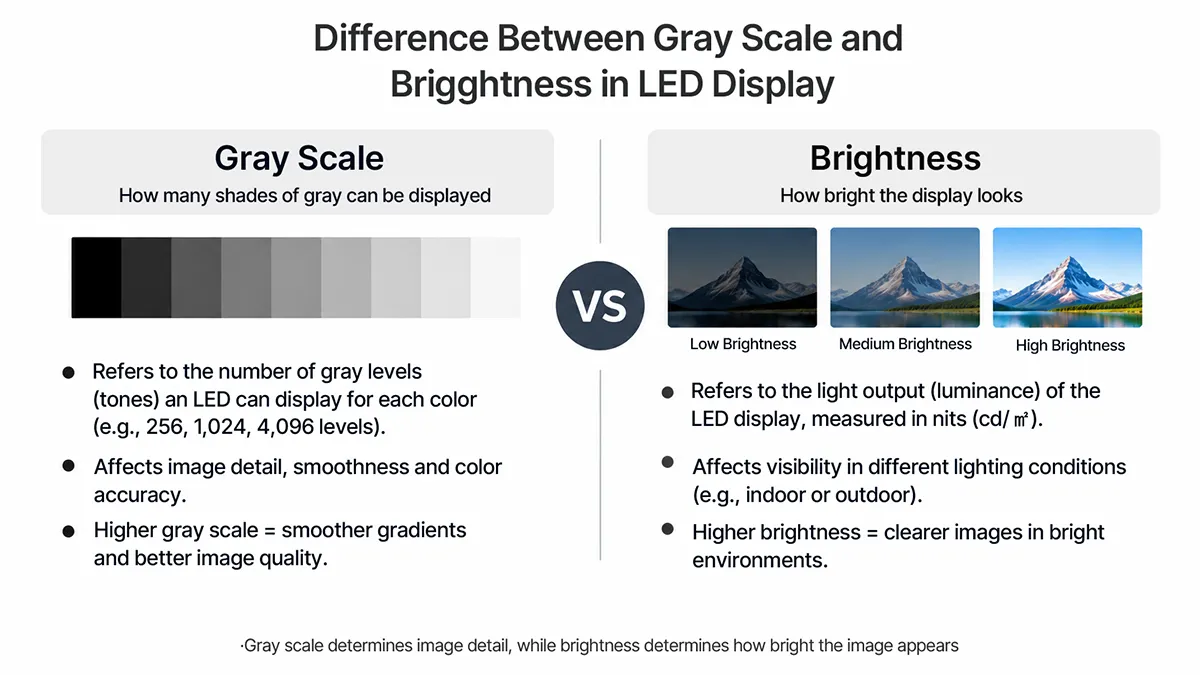
From giant outdoor LED advertising screens to indoor wall, LED displays are everywhere. When you’re shopping for LED displays, you’ve probably heard of the concepts of grayscale and brightness in LED displays, but how are they related and different?
What is LED display grayscale?
The Grayscale of an LED displays is the range of brightness levels between the darkest black and the brightest white that can be displayed. Essentially, it is the spectrum of gray levels that an LED pixel can produce. Each pixel in an LED display can be altered in intensity to produce different shades of gray, which enhances the depth and detail of the overall image. The number of gray levels an LED display can produce directly affects its ability to display detailed, lifelike images.
Higher gray levels allow for finer transitions between tones, which improves image quality through more detailed textures and smoother gradations.
What is LED Display Brightness?
The brightness of an LED screen is measured in nits or candelas per square meter (cd/m²) and refers to the intensity of light emitted by the screen. It measures the amount of light produced by the screen and affects how content is viewed in various lighting conditions. Brightness is a key attribute of LED displays, especially for outdoor LED displays in direct sunlight.
Conversely, indoor screens may require lower brightness, but still need to be adjusted for ambient light conditions to ensure comfort and prevent eye strain.
The Difference Between Gray Scale and Brightness in LED Display Screens
Grayscale and brightness are intertwined in defining the visual quality of an LED display. Grayscale depth requires precise control of the brightness level of each pixel to render the various shades between black and white. They are a balancing link. Increasing the brightness of an LED screen without properly adjusting the grayscale can result in a faded image that loses exquisite detail.
Conversely, a monitor with excellent grayscale but insufficient brightness may not achieve the desired effect, especially in bright environments.
Optimizing both attributes for the intended use improves the result. For a DOIT VISION project, first define the lighting conditions and content, then evaluate brightness and tonal detail together on the proposed LED configuration. A high headline brightness or bit-depth number on its own does not establish picture quality.
To clarify the difference between grayscale and brightness in LED displays, you can refer to the following:
Scroll horizontally to see all columns on a small screen.
| Aspect | Grayscale | Brightness |
|---|---|---|
| Definition | The available intensity steps between black and white, applied to the RGB channels in a color LED display. | The screen’s emitted luminance, normally specified in nits. |
| Main Purpose | Used to transmit pictures, determining the clarity and detail of the image by allowing for the representation of different shades of gray. | Controls the overall visibility of the display, affecting how easily the content can be seen under various lighting conditions. |
| Information conveyed | How finely changing intensity can represent gradients, shadows and texture. | How much light the screen emits at a specified operating setting. |
| Impact on Picture Quality | Affects the detail and texture of the image, allowing for nuanced visual content with depth and realism through the representation of multiple shades. | Influences the display’s ability to be seen and interacted with, especially in environments with varying light conditions, and affects the overall vibrancy of the image. |
| Relationship with color | Intensity steps in each RGB channel contribute to both neutral gray and color reproduction. | Brightness, white balance and calibration jointly affect perceived color. |
How to Adjust the Gray Scale of an LED Display
Adjusting the grayscale of an LED display screen involves calibrating the display to ensure that it accurately renders the full spectrum of grayscale tones between black and white. There are two main ways to control the grayscale of LEDs: adjusting the current and using pulse width modulation (PWM).
Adjusting the current flowing through the LED
The first method involves varying LED drive current within the limits of the selected driver and LED package. There is no universal 20 mA operating value for every display. Current, temperature and calibration can affect light output and color, so a buyer should evaluate the specified operating mode rather than manually alter module current settings.
Pulse Width Modulation (PWM)
The second method is Pulse Width Modulation, which utilizes the visual ephemeral properties of the human eye. By rapidly turning LEDs on and off in very short periods of time (adjusting the duration (or width) of the “on” pulse relative to the “off” period (duty cycle)), PWM can simulate a variety of brightness levels.
At sufficiently high switching rates, viewers perceive an integrated light level rather than separate pulses. Cameras may still reveal artifacts depending on exposure, scanning and timing. PWM is widely used in LED drivers, but usable low-gray performance must be checked at the intended brightness and refresh configuration.
LED Display Control Systems
Modern LED screens typically utilize PWM for grayscale control and integrate it into their control system, which consists of the main control box, the scanner board and the display panel itself. The control box receives pixel brightness data from the computer’s display card and redistributes it to multiple scanner boards. Each scanning board manages a specific number of rows (or columns) on the LED display, transmitting control signals to individual LEDs in serial mode.
Serial transmission of display control signals
Two useful architectural concepts are centralized timing and distributed driver control. A controller can prepare the timing or intensity information centrally, while driver ICs at the modules apply the current and switching pattern to the LEDs. The exact division of work varies with the receiving cards and drivers.
In a distributed PWM implementation, intensity values are loaded into driver registers and the driver generates the output pulses. This can reduce the need to transmit every switching transition from the upstream controller. Modern driver ICs may provide much more than 8-bit grayscale processing; the Texas Instruments TLC5958 documentation, for example, describes 16-bit PWM control. This example explains driver operation and is not a component claim for a particular DOIT VISION series.
The practical purchasing question is how the complete system behaves. Ask which input bit depth is accepted, which internal processing mode is used and whether reducing screen brightness preserves smooth dark gradients. A specification for one chip is not proof of the output of the complete wall.
In practice, to adjust the grayscale of an LED display, you may need specialized software and equipment. Below are the abbreviated steps:
Calibration equipment and software: Use suitable measurement equipment and the calibration workflow supported by the selected control system. Record the target brightness, white point and signal range before making adjustments, and keep the original configuration available for comparison.
Setting the black level: First adjust the black level of the display to ensure that the darkest blacks are as deep as possible without losing detail in dark scenes.
Gamma Correction: Set the appropriate transfer response so the incoming signal is reproduced with the intended relationship between code values and luminance. Gamma is not a promise that physical luminance becomes linear to human perception; use test patterns and measurements to verify the chosen response.
Final Test and Adjustment: After the initial adjustments, the monitor is tested with a series of images to ensure that the grayscale rendering is fully accurate.
What happens to an LED display if the grayscale is not set correctly?
If the grayscale settings on an LED display are configured incorrectly, it can lead to a variety of detrimental effects that can harm the performance of the display and the viewer’s experience. Examples of potential errors are listed below:
Loss of image detail and color distortion
Problem: Inadequate grayscale settings can reduce the number of brightness levels that can be displayed by the display, resulting in a loss of image detail.
Example effect: Subtle gradations of sky or texture in a natural scene become blurred and may not accurately reproduce colors, resulting in unnatural or skewed tones, especially noticeable in detailed or textured images such as human faces.
Reduced image contrast and sharpness
Problem: Incorrect grayscale affects the monitor’s ability to distinguish between the lightest and darkest elements, which affects overall contrast and image sharpness.
Example effect: Images may appear too bright or too dark, which impairs the depth and richness of visual content. Details may be blurred, making it difficult to distinguish between different elements in the image.
Wasted energy and shortened lifespan
Problem: Running a screen brighter than the venue requires can increase power consumption and thermal load. Higher grayscale bit depth alone does not necessarily increase brightness or shorten display life.
Example effect: Unnecessarily high brightness can raise operating costs and thermal load. Evaluate these effects through the actual operating configuration; a grayscale setting alone does not establish a particular lifetime or failure rate.
Decreased Audience Experience
Problem: The cumulative effect of these problems significantly reduces viewer enjoyment.
Example effect: A combination of blurry images, distorted colors, and insufficient contrast can lead to viewer fatigue, making prolonged viewing of a display uncomfortable or less engaging.
To summarize
Both the grayscale and the brightness of an LED display are important for achieving optimal image quality. Good brightness ensures that the LED display can be easily seen in a variety of lighting conditions, while depth of gray adds nuance and detail to the image, making the content lifelike, realistic and vibrant. Whether it’s outdoor advertising, indoor LED screens for entertainment, DOIT VISION will do its best as possible, so feel free to contact us if you need a high quality LED display.
Grayscale in indoor and outdoor LED displays
The differences between the grayscale requirements of indoor and outdoor LED displays, like this:
Scroll horizontally to see all columns on a small screen.
| Feature | Indoor LED Displays | Outdoor LED Displays |
|---|---|---|
| Grayscale requirements | Evaluate gradients at the intended indoor brightness | Evaluate gradients at both daytime and dimmed nighttime settings |
| Environmental Lighting | Relatively stable indoor lighting | Varies significantly with direct sunlight and shadows |
| Proximity to Audience | Closer viewing distances require finer detail and color changes | Typically viewed from greater distances; focus is on brightness and contrast |
| Image Quality | Requires delicate and realistic image effects with richer colors and clearer details | Prioritizes clear visibility under various lighting conditions, emphasizing brightness and contrast over detail |
| Grayscale Performance | Aimed at displaying more brightness levels for a nuanced visual experience | Ensures adequate grayscale to maintain color contrast and detail in strong light |
| Control System Optimization | Essential for enhancing grayscale and color reproduction | Crucial for balancing brightness, contrast, and grayscale to optimize outdoor visibility |
Checking grayscale at your project brightness
Before accepting an LED wall, test neutral ramps, dark gradients, skin tones and your own graphics at the actual operating brightness. Repeat the test after dimming; a wall that looks smooth at maximum output may behave differently in a dim meeting room. Keep source format and processor settings consistent when comparing samples.
Record the brightness setting, control-system configuration and ambient light alongside the observations. This makes an issue reproducible and helps distinguish source banding from a display or calibration problem.
For close-view indoor work, review fine-pitch LED displays. Include the viewing distance, room lighting, screen dimensions and representative content when discussing a configuration. For bit-depth terminology, continue with LED display grayscale.
Bring the screen dimensions, viewing distances, content and installation conditions to the next step.