 All-in-One COB LED TV
  Flexible LED Displays
  Transparent LED Displays
  Led Poster
  Circular LED Displays
  Creative & Custom LED Displays
 What is HDR Display?
High Dynamic Range (HDR) Dynamic range is the difference between light and darkness in the field of imaging. The greater the dynamic range, the greater the amount of light and dark detail recorded on the image at the same time.
- There’s HDR in photography;
- There’s HDR in cinematography;
- There’s HDR in video;
- There’s HDR in display;
But none of these HDRs refer to the same technology.
The HDR equipped on mobile phones is actually a multi-frame compositing technology, where the phone shoots multiple frames at the same time in a single frame. And then uses algorithmic processing to combine the light and dark parts of the different frames together, in order to preserve both highlight details and dark details at the same time.
This is indeed in line with the purpose of HDR high dynamic range, but since it is manually involved, the level of effect varies between different phones.
And there are sometimes problems with overcorrection and unnatural contrast. Therefore, strictly speaking, this kind of HDR-processed photos or videos still belong to the category of SDR.
True HDR is technically defined as HDR following its own unique set of photoelectric conversion mechanisms- the conversion between optical and electrical signals. When we take a picture, the real scene will be saved as a digital signal for the photo, which is a process of converting optical signals into electrical signals.
Obviously, the so-called HDR of cell phone photos is only a software process, which does not involve the conversion of photoelectricity, so they can not be considered as real HDR, which is technically called “tone mapping”.
What is SDR Display?
SDR refers to Standard Dynamic Range Image. It is also the traditional standard for movie and television images. Before the popularization of HDR technology, the dynamic contrast of 1080P images in the past was presented through SDR technology, but its dynamic range is much smaller than the dynamic range that the human eye can perceive.
Difference between HDR and SDR

Technology Difference
First of all, there is the technical aspect, the gamma curve is different between the two. The gamma curve defines a non-linear change in the luminance of light in an image system.
| Category | Resolution | Quantization Bit Depth | Color Space | Brightness Range |
|---|---|---|---|---|
| HDR | 3840*2160 | 10/12 bits | Rec. 2020 | 0.0005-10,000 |
| SDR | / | 8/10 bits | Rec. 709 | 0.05-100 |
The SDR and HDR use different gamma curves, which means that when we look at an HDR source, we see more luminance information. Ultimately, HDR has a higher color depth, wider dynamic range, and stronger color expression.
Bit Depth Comparison
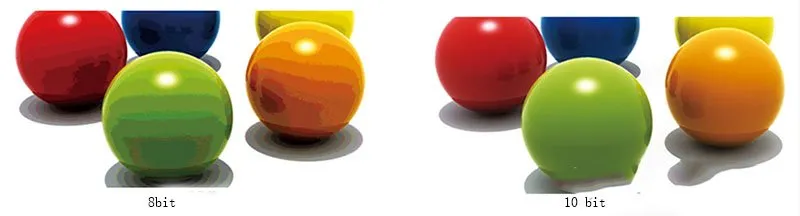
Bit depth refers to the number of colors that can be displayed per pixel. The greater the bit depth, the more colors can be displayed, resulting in a smoother and more natural gradation. For example, an 8-bit monitor can display approximately 16.77 million colors, while a 10-bit monitor can display approximately 1.07 billion colors.
Color Gamut Depth Comparison
The contrast of color gamut refers to the range of all colors that can be displayed. The chart on the right shows the range of all RGB values that the human eye can perceive. The triangles indicate the color gamut: the larger the triangle, the more colors can be displayed.
Video Frame
HDR video has different brightness and contrast for each frame, which can perfectly restore the details and contrast between light and dark of each frame. SDR video is relatively poor, although in theory you can manually adjust the saturation and contrast of the screen to achieve the same effect of HDR, but it is still a theory, it is quite cumbersome to operate, and multiple adjustments will easily result in a distorted image.
Video Light and Dark
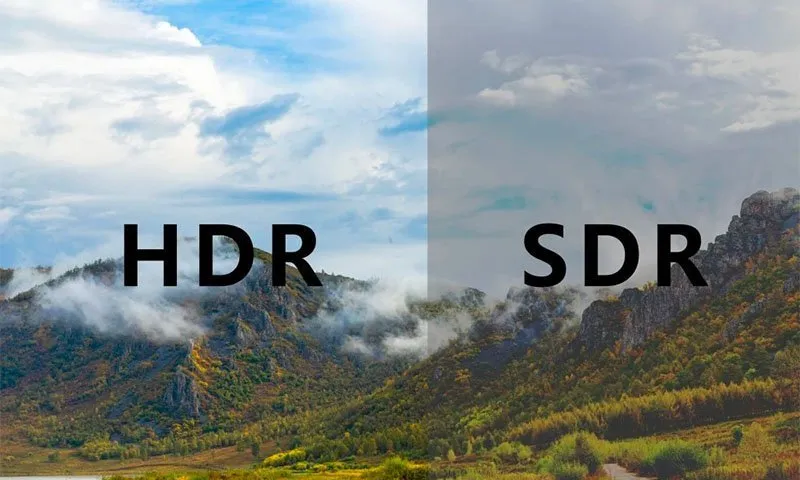
We can compare the above image. SDR image presented by the mountain is darker, where the details of the light and bright parts can not be shown.
From HDR image, we can clearly see the forest environment behind the mountain and the clouds of the relative darkness of the picture, but also according to the different brightness to present the brightness details are not the same.
Video detail
Images with HDR technology show more detail between the dark and light of the screen. As an example, the same image played back in SDR has a curve of dots spaced 1 to 100, and in HDR it has a curve of dots spaced much less than 1, between 1 and 1000. As a result, images with HDR technology naturally show better color saturation and gradation.
HDR Technology Standards:
| Dolby Vision | HDR10 | HDR10+ | HLG | |
|---|---|---|---|---|
| Display Curve | PQ | PQ | PQ | HLG |
| Bit Depth | 10/12 bits | 10 bits | 10 bits | 10 bits |
| Brightness Range (nits) | 0.001-10,000 | 0.003-1,000 | 0.003-1,000 | -1,000 |
| Color Space | Rec. 2020/P3 | Rec. 2020 | Rec. 2020 | Rec. 2020 |
| Metadata | Dynamic | Static | Dynamic | None |
| Licensing | Fee | Free | Free with Device Certification Fee | Free |
| Encoding Method | Proprietary Hardware | Software | Software | Software |
| Tone Mapping Method | Official Algorithm | Proprietary Algorithm | Proprietary Algorithm | No |
HDR and SDR: Which is better?
Through the effect of HDR and SDR comparison, we can know that HDR is better, after all, HDR technology is with the continuous updating and upgrading of image technology after the emergence of the product.While SDR is the traditional technology, naturally, not compared to the newly emerged technology.
However, the current release of 4k HDR video quality is mixed, the quality of good and bad, crude 4K HDR, the effect and SDR and SDR can not pull the gap, and even some are not as good as SDR, the same movie 4K SDR from the 4K HDR source.
In terms of the same movie, the 4K SDR effect is difficult to surpass the HDR version, but this is based on the movie itself, to the playback of their respective equipment will have their own. However, when it comes to playing it on your own devices, you will have your own reality. When your own devices can’t support or show the 4K HDR of a movie well, try its 4K SDR version, and you may be amazing the result.
How to realize HDR display?
There are five dimensions of the picture that need to be enhanced to achieve a standard HDR display: luminance dynamic range, grayscale, color gamut, resolution and frame rate.
Frame rate
When playing some fast dynamic images, the frame rate is too low will lead to jagged dynamic images, dragging and other display abnormalities. LED display can be as high as 2880-7680HZ refresh rate with the front-end playback equipment 60-120 frames of the screen input, to effectively solve the problem of high-speed dynamic images display abnormalities.
Gray scale
HDR display standards require a video color depth of 10Bit. Compared with the conventional video color depth of 8bit requirements, the gray level expanded by 4 times. To achieve the HDR display effect, you need to specifically customize the video source and playback equipment to support HDR mode, the LED display can be as high as 18Bit gray scale.
Luminance Dynamic Range
HDR display requires a higher dynamic range of brightness, conventional LCD or other displays only have a brightness range of 40-400nit brightness, while the LED display can reach a brightness range of 0.5-1200nit brightness. Compared to other displays, LED display brightness dynamic ratio is greater, more in line with the requirements of HDR display.
4K Resolution
HDR video source format is 3840*2160 4K resolution, LED display has unlimited combination, free splicing characteristics, can be easily spliced into 4K, 8K resolution level display.
Color gamut
Conventional display SDR mode color gamut requirements for RC.709, HDR color gamut for BT.2020 color rendering index is significantly better than RC.709, LED display color gamut is closer to the requirements of BT.2020, which is far away from the exotic beauty of the maximum degree of recovery to the screen in front of the viewing you.
What’s HDR 10?
HDR 10 is a specification made public by the CEA (Consumer Electronics Association) in 2015,including several key points: color sampling support for 4:2:0, color depth support for 10bit, color gamut support for BT.2020, and most importantly, “the ability to carry HDR information (SMPTE ST 2086 Luminance Curve) in Metadata (post-processing information)”. In addition, the most important “image Metadata can carry HDR information (SMPTE ST 2086 luminance curve), in which the Maximum Content Light Level (MaxCLL) is 1000 nits.”
Which is better, HDR10 or HDR400?
HDR10 and HDR400, HDR500, HDR600, HDR1000, etc. It seems similar concepts, all with a number after HDR, but the actual meaning is far different.
HDR10 is one of the most commonly and widely used HDR formats, and refers to the protocol and standard for transmitting HDR content between the graphics card and the monitor, which is an open standard that does not require the payment of any copyright or certification fees.
HDR400, HDR500, HDR600, HDR1000, HDR1400 are the VESA’s Display HDR classifications. Display HDR is a standard for measuring the HDR effect of a monitor, which is based on the support of HDR10.
It is divided into classes according to the monitor’s brightness, color gamut, color depth, dimming type, black level, etc. HDR400, only requires a monitor with peak brightness of not less than 400nit, native 8bit color depth, 95% RGB color gamut, and global dimming.
* Global dimming (Global dimming): there is only one backlight partition on the screen, and it can only be adjusted uniformly across the screen, either the whole screen is brighter or the whole screen is darker;
* Regional dimming (Local dimming): the screen backlight is divided into multiple regions, each region can independently adjust the brightness.
HDR500 and above, the certification requirements have been qualitatively improved: area dimming, 10bit color depth, 90% DCI-P3 color gamut, etc., the most important of which is the area dimming, can greatly improve the contrast and dynamic range, to achieve a true HDR experience, 10bit color depth and P3 wide color gamut at the same time can also bring a better sense of color perception.
| Minimum Peak Luminance (cd/m²) | Range of Color (Color Gamut) | Typical Dimming Technology | Maximum Black Level Luminance (cd/m²) | Maximum Backlight Adjustment Latency (Number of Video Frames) | |
|---|---|---|---|---|---|
| DisplayHDR 400 | 400 | sRGB | Screen-level | 0.4 | 8 |
| DisplayHDR 500 | 500 | WCG* | Zone-level | 0.1 | 8 |
| DisplayHDR 600 | 600 | WCG* | Zone-level | 0.1 | 8 |
| DisplayHDR 1000 | 1000 | WCG* | Zone-level | 0.05 | 8 |
| DisplayHDR 1400 | 1400 | WCG* | Zone-level | 0.02 | 8 |
| DisplayHDR True Black 400 | 400 | WCG* | Pixel-level | 0.0005 | 2 |
| DisplayHDR True Black 500 | 500 | WCG* | Pixel-level | 0.0005 | 2 |
| DisplayHDR True Black 600 | 600 | WCG* | Pixel-level | 0.0005 | 2 |
*WCG: Wide Color Gamut
FAQs:
Does HDMI 2.0a support HDR data format transmission?
In the actual transmission process, the source side will identify whether the sink side supports HDR function through DDC channel. if it is supported, it will transmit the metadata packet, and the sink side will adjust the display parameters according to the acquired metadata packet to realize HDR effect. You can refer to CTA-861-G specification.
| Byte# | 7 | 6 | 5 | 4 | 3 | 2 | 1 | 0 |
| 1 | Tag Code (0x07) | Length of following data block = n bytes | ||||||
| 2 | Extended Tag Code (0x06) | |||||||
| 3 | F37=0 | F36=0 | ET_5 | ET_4 | ET_3 | ET_2 | ET_1 | ET_0 |
| 4 | SM_7 | SM_6 | SM_5 | SM_4 | SM_3 | SM_2 | SM_1 | SM_0 |
| 5 | Desired Content Max Luminance data (8 bits) | |||||||
| 6 | Desired Content Max Frame-average Luminance data (8 bits) | |||||||
| 7 | Desired Content Min Luminance data (8 bits) | |||||||
What is Difference between HDR10 and HDR400?
HDR10 and HDR400 cannot be compared together.Why?
HDR10: It is a standard for HDR, similar to HDR10+, HLG, HDR Vivid, DOLBY VISION, etc.
HDR400: It is a certification of HDR display effect of the monitor [VESA DisplayHDR certification], indicating the level of HDR effect of the monitor, similar to HDR600, HDR1000 and so on.
Therefore, HDR400 can only measure the good and bad of the monitor, but HDR10 can not. HDR10 can only show that the monitor supports HDR10 standard decoding.