All-in-One COB LED TV
  Flexible LED Displays
  Transparent LED Displays
  Led Poster
  Circular LED Displays
  Column LED Screens
  Creative & Custom LED Displays
 4:3 describes shape, not a fixed pixel count. Use the resolution chart first, then compare 16:9, camera formats and ways to fit content to a display.
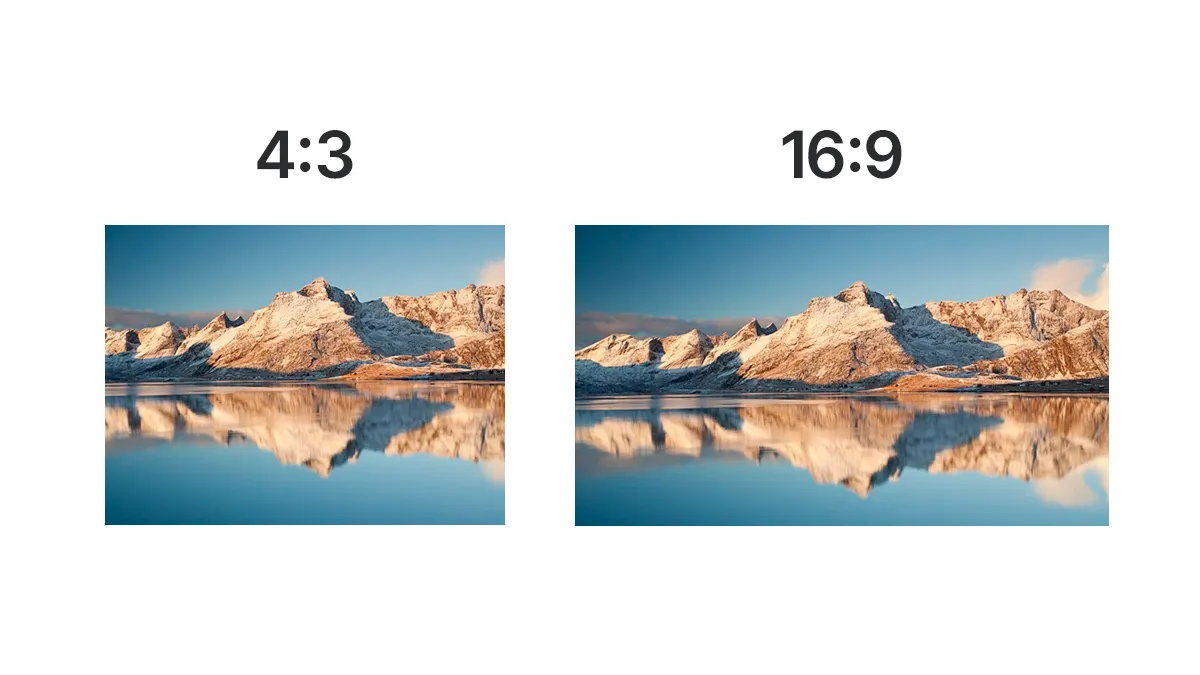
4:3 resolutions in pixels
For square pixels, a resolution is 4:3 when width divided by height equals 4/3. The table lists common examples, not the only possible sizes.
Scroll horizontally to see all columns on a small screen.
| Resolution in pixels | Total pixels | Common label or use |
|---|---|---|
| 640 × 480 | 307,200 | VGA |
| 800 × 600 | 480,000 | SVGA |
| 1024 × 768 | 786,432 | XGA |
| 1280 × 960 | 1,228,800 | 4:3 image or display mode |
| 1400 × 1050 | 1,470,000 | SXGA+ |
| 1440 × 1080 | 1,555,200 | 4:3 with square pixels |
| 1600 × 1200 | 1,920,000 | UXGA |
| 1920 × 1440 | 2,764,800 | High-resolution 4:3 image |
| 2048 × 1536 | 3,145,728 | QXGA |
1280 × 1024 is 5:4, while 1920 × 1080 is 16:9. Legacy anamorphic video can store a 1440 × 1080 frame and display it as 16:9 using non-square pixels; check the pixel-aspect metadata before deciding its displayed shape.
Have you ever come across a picture that looks beautiful on your phone but appears stretched on your computer screen? This is where aspect ratio comes in. To avoid pictures with stretched, choppy, distorted, squeezed and shrunk appearance, you need to work out your aspect ratio situation.
In the past, there were only a few options but today with a wide range of displays, there are different aspect ratios with each catering to a different type of display.In order to take the best picture, you’ll need to understand what it actually is.
Choose the ratio for the intended display and the composition you need. Pixel resolution, physical screen dimensions and aspect ratio are related, but they describe different things.
What is Aspect Ratio
Aspect ratio is the relationship between width and height. To explain it further, it’s a proportional relationship between height and width of something. This does not determine the size of the object, but its ratio and shape. It’s written with a colon between two number, eg. a:b.
Aspect ratios usually describe images, video frames or display surfaces. The ratio stays the same when both dimensions scale proportionally. A photograph does not automatically change its aspect ratio when moved from a phone to a computer: software may fit, crop or stretch it to the available screen. The display shape and the image shape can therefore differ.
The first number represents width and the second represents height. A decimal ratio expresses the same width-to-height relationship: 16:9 is approximately 1.78:1, and 4:3 is approximately 1.33:1.
Types of Aspect ratio
Some of the subsets of aspect ratios are:
- Pixel aspect ratio
Pixel aspect ratio is the relationship between the width and height of one pixel. Most modern computer images and direct-view LED canvases use square pixels, with a 1:1 pixel aspect ratio. Some legacy video formats use non-square pixels, so their stored frame dimensions alone do not describe the final displayed shape. A 4:3 display does not mean its individual pixels are 4:3.
- Display aspect ratio
The proportional relationship between the width and height of the displayed image is its display aspect ratio. Match this shape to the intended screen. If the image and screen ratios differ, fitting preserves the image with borders, cropping fills the screen while losing edges, and stretching changes the shape of objects. Distortion is a consequence of stretching, not an unavoidable result of a ratio mismatch.
- Storage aspect ratio
Storage aspect ratio refers to the aspect ratio of digital video files. It represents the proportion of width to height of video frame size. Each frame of the video should have a consistent ratio. For the widescreen videos, the formula mostly is usually SAR x PAR = DAR.
How to measure Aspect Ratio
It’s important for photographers and videographers to calculate the size. Since each display has a certain aspect ratio and cameras too have fixed aspect ratio, the images need to be optimized at times to match up with the screen.
Aspect ratios are independent of the size of the image. Regardless of what the size of the image is, it’s actually a ratio of the height and width of the image. When it is represented with a colon in between numbers, the first number represents the width and the second represents the height.
To calculate the aspect ratio, reduce width:height by their greatest common divisor. For 1600 × 1200 pixels, dividing both numbers by 400 gives 4:3. To resize without distortion, use new height = new width × original height ÷ original width. For example, a 1200-pixel-wide 4:3 image needs a height of 900 pixels. These calculations assume square pixels.
Why are Aspect ratios important?
Aspect ratios affect how you take your picture and how your final image will look like. Since multiple devices can have different aspect ratios, the image will need to match with it. The photographers and the videographers would need to optimize the aspect ratio of an image to match the display.
Planning the final ratio while capturing gives you more freedom later. If important subjects fill a 4:3 frame from top to bottom, cropping it to a wider ratio can remove part of the scene. Leave enough space around the subject when you need both photographic and widescreen versions. You can also fit the full image inside another canvas with borders instead of cropping.
Same goes for wide aspect ratios. If you capture the image in a very wide aspect ratio, it would be highly difficult for you to crop the image without cropping out sides. This is why it’s crucial for you to understand the aspect ratio before capturing images. The best option would be to go for a ratio where you would have more options later to optimize.
What are some of the common aspect ratios?
Some of the most common aspect ratios are,
- 1:1
A 1:1 image has equal width and height. It is a square, commonly used for social posts, product images, printed photographs and square digital signs. It is useful when the composition needs similar space in both directions. On a wider television or video wall, the image can be fitted with side borders or placed within a wider content layout.
- 5:4
The 5:4 ratio is associated with large-format photography and landscape versions of 8 × 10 or 16 × 20 prints. In portrait orientation those become 4:5. Check the orientation and crop before printing; a camera image with another ratio may need some of its edges removed to fill the paper.
- 3:2
Many full-frame and APS-C digital cameras use 3:2, following the proportions of 35 mm still photography. A 6 × 4 inch print also has a 3:2 landscape ratio. Smartphones commonly use other native ratios, including 4:3, so verify the actual image dimensions instead of assuming all digital cameras use the same shape.
- 4:3
The 4:3 ratio appears in many compact cameras, smartphone photo modes and Micro Four Thirds cameras, as well as older televisions and projectors. It leaves more vertical room than a 16:9 crop at the same width. Sensor size alone does not determine the aspect ratio; check the camera’s native image format and any crop setting.
- 16:9
The 16:9 aspect ratio is common in television, online video, computer monitors and presentation screens. It can suit a landscape composition or a wide stage backdrop. Cinema also uses other, often wider, ratios; 16:9 is not a universal cinema format. When a camera offers a 16:9 photo mode, it may crop the sensor’s native image rather than capture extra horizontal detail.
Aspect ratio tools
Optimizing aspect ratios is highly crucial. Since each device has a different aspect ratio, photographers, videographers and software developers creating content for different devices need to optimize the ratio to match the device. For this reason, tools that can adjust the aspect ratio prove to be the creator’s best friend.
Post production software like Photoshop, Lightroom and Capture One can help you in adjusting the aspect ratio of your image. There are even some software online that can change the aspect ratio of your image with just a single click.
16:9 vs 4:3 which aspect ratio is better
16:9 and 4:3 are two of the most popular aspect ratios used in the world. Yet it’s important to understand which aspect ratio is best for you. Different aspect ratios serve different image types. This is why you need to understand the fundamentals of the aspect ratios to choose the best one.
For videos, 16:9 usually serves the best. Since it produces a frame with width that is 78% more than its height, the images produced are widescreen. For this reason, this aspect ratio works best for videos where you need to capture a wider area and have more elements in one frame. It’s also good for images that need to capture a higher width.
4:3 can work well for photography when it matches the camera’s native format or the intended composition. It does not inherently offer higher resolution than 16:9: resolution depends on the pixel dimensions. At a fixed capture width, cropping a 4:3 image to 16:9 removes vertical pixels. Choose the print ratio separately, since common paper sizes do not all match 4:3.
Scroll horizontally to see all columns on a small screen.
| Feature | 4:3 Aspect Ratio | 16:9 Aspect Ratio |
|---|---|---|
| Width relative to height | Width is about 1.33 × height | Width is about 1.78 × height |
| At equal height | Narrower canvas | About 33% wider than 4:3 |
| At equal width | More vertical canvas | 25% less height than 4:3 |
| Common uses | Photos, legacy AV, some dashboards | Television, online video, presentations |
| Resolution | Determined by pixel dimensions | Determined by pixel dimensions |
| Printing | Match the paper ratio or plan a crop | Match the paper ratio or plan a crop |
| Reframing | Leave room around the subject | Leave room above and below important content |
| Screen playback | Fit, crop or design a matching layout | Fit, crop or design a matching layout |
Conclusion
Understanding aspect ratio helps you avoid unwanted stretching and cropping. Start with the image or video you need to show, check its pixel dimensions, and decide how it should fit the final surface. Keep a full-resolution original so that different display and print versions can be prepared without repeatedly cropping the same file.
Applying aspect ratio to an LED wall
Start with the required content layout, then match it to the wall’s physical dimensions and native pixel canvas. For example, a hypothetical 4 m × 3 m image area is 4:3, while a 4 m × 2.25 m area is 16:9. These are planning dimensions, not a promise that every cabinet system can form those exact sizes.
For an existing 4:3 presentation on a wider wall, choose between side borders, a redesigned slide layout or a deliberate crop. Do not stretch circles, logos or faces to fill the canvas. Confirm the final pixel map with the content team before producing graphics.
Use the LED display calculator to explore size and resolution, then compare LED video wall options. Supply the available width and height, nearest viewing distance, source resolution and installation type for a practical layout review.
Bring the screen dimensions, viewing distances, content and installation conditions to the next step.