 All-in-One COB LED TV
  Flexible LED Displays
  Transparent LED Displays
  Led Poster
  Circular LED Displays
  Column LED Screens
  Creative & Custom LED Displays
EXHIBITIONS
Show information in the round
Use a globe for geographic data, science content or a visual story that visitors can walk around.
A display built around a globe, a dome or an inward-facing hemisphere. Start with the shape and viewing position; we help define the diameter, pixel pitch, content map and installation.
A site photo and an approximate diameter are enough to begin.

An LED sphere wraps video around a three-dimensional structure. A full globe can be seen from different sides; a hemisphere places the image on either its outside or its inside.
The frame, LED modules and pixel map are designed together. Diameter sets the scale in the room, pitch sets the image detail, and the mounting position determines how people approach the display.
Use a globe for geographic data, science content or a visual story that visitors can walk around.

Place a sphere above a circulation route or make a dome part of the architecture.

An inward-facing hemisphere turns a concave surface into a portal or intimate viewing zone.
02 / Choose the form
These are three different structures. The visible side of the modules and the way people move through the space lead the choice.
 VIEWED ALL AROUND
For an object that reads as a globe from multiple approaches. Specify its diameter, whether it hangs or
stands, and the surface that needs to remain visible.
 CONVEX / VIEWED OUTSIDE
A half-globe facing the room. Its supporting edge, rear structure and service route depend on the surrounding architecture.
 CONCAVE / VIEWED INSIDE
A curved portal that faces people looking into it. Opening size, sightline and access behind the surface shape the build.
03 / Product features
A finished result depends on the structural frame, the curved module layout and a content map made for the built surface.
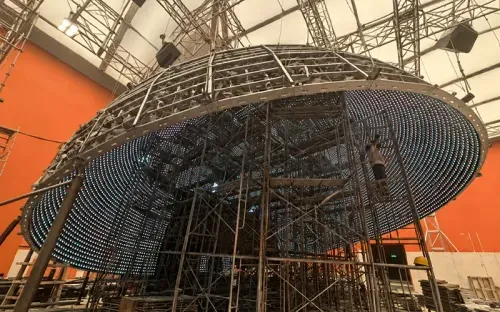
A full sphere and the two hemisphere orientations use different supports. Agree the opening, lifting and mounting points before production.
Choose the size for the space and the pitch for viewing distance and content detail. Standard indoor diameters vary by model.
Prepare artwork against the confirmed pixel map so seams, the poles and the visible viewing zones are considered.
Front maintenance still needs a safe working route. Keep access and cable paths in the installation plan.
Explore illuminated spheres, installed displays, structural frames and module details. Select a photo or video for a closer look.
05 / Size and pixel pitch
Indoor catalog models offer different diameter choices at each pitch. Send the approximate diameter and the nearest normal viewing distance; the final resolution, frame size and load follow the project drawing.
SS-1.25 / SS-1.5 / SS-1.875 / SS-2 / SS-2.5
P1.25–P2.5 · Mooncell · Front maintenance
Catalog reference: 1,000 cd/m² and 3,840 Hz refresh
Usual pitches: P2.5 / P3 / P4 / P5
Catalog diameter reference: Ø1–6 m · IP65
Brightness, structure and electrical load are confirmed for the exposure and project.
| Model | Pixel pitch | Listed diameters | Planning note |
|---|---|---|---|
| SS-1.25 | 1.25 mm | Ø0.3 / 0.6 / 1.0 / 1.4 / 1.8 / 2.0 m | Fine detail for closer viewing |
| SS-1.5 | 1.5 mm | Ø1.0 / 1.5 m | Confirm which listed size fits the site |
| SS-1.875 | 1.875 mm | Ø1.5 m | Check content detail and sightline |
| SS-2 | 2 mm | Ø0.5 / 1.0 / 1.2 / 1.5 / 2.0 / 2.5 m | Check transport format as size grows |
| SS-2.5 | 2.5 mm | Ø0.4 / 0.5 / 0.8 / 1.15 / 1.33 / 1.5 / 2 / 2.5 / 3 / 4 m | Confirm module layout and access |
Available diameters vary by pixel pitch. Final resolution, weight, power and mounting details are confirmed
with the selected configuration.
For public areas where guests can reach the display, ask for the optional GOB surface treatment when
requesting the configuration.
06 / Mooncell control and content
Mooncell’s sphere solution combines a controller for the curved LED layout with a playback source for the show. The screen map and playback setup are confirmed for the sphere that is built.
01 / Flat content map
02 / Mapped LED sphere
Pixel mapping follows the final sphere geometry
HOW PLAYBACK WORKS
During commissioning, the LED modules and pixel positions are configured in the Mooncell control system.A connected playback server can run prepared videos, images and text; a live video input can be planned when the project needs it.
The controller maps that source across the built sphere. The exact software, player, input connections and method for updating content are supplied with the selected control package.
Before production, request the final pixel dimensions, seam position, pole orientation and a test image for your exact sphere or hemisphere.
Keep small text and logos away from the seam and poles. Send a still frame and a short motion sample to check orientation, continuity and distortion on the assembled screen.
Import the finished files into the specified Mooncell playback software for local playback, or feed the agreed live source. File format and export settings follow the supplied system manual.
07 / Installation
The screen, structure and site access are one decision. Share a site photo, dimensions and the intended viewing route so the support and service plan match the space.

01 / SUSPENDED
Confirm the rated point, load path, rigging access and cable route. The local installer checks the supporting structure against the approved drawing.

02 / FLOOR
Confirm base footprint, stability, visitor clearance and power routing. Allow a safe route to access modules for maintenance.

03 / INTEGRATED
Coordinate the edge, backing structure and access route with the surrounding wall, ceiling or portal
before finishing works.
08 / Packing and delivery
The packed assembly must fit the freight route and the building access. Confirm the package format before the site team books lifting equipment or closes an opening.

LARGER DIAMETERS
Above roughly Ø2 m, plan a modular kit and supervised site reassembly. Include the frame, module map, access equipment and commissioning time in the installation scope.

PREFERRED WHEN PRACTICAL
Ø1.0, Ø1.5 and Ø1.8 m are useful starting points when the project can accept a whole unit. Packing limits, route dimensions and handling still need confirmation for each order.
Ask the quotation to list package count, outside dimensions, gross weight, spares, mounting hardware, cabling and the drawings supplied for handover. Check doorways, lifts and the route to the final mounting position.
Begin with the shape, an approximate size and a photo of the location. The engineering details can follow.
An LED sphere display is a three-dimensional screen made from curved LED modules on a structural frame. A full sphere shows content around a globe; hemispheres show it on either a convex outside or a concave inside. Diameter, pixel pitch, content map and mounting arrangement are selected together for the location and viewing route.
Choose a full sphere when viewers will approach from several sides and the display should read as a complete globe. Choose an outward hemisphere for a luminous dome viewed from outside. Choose an inward hemisphere when people look into a concave portal. Each form needs its own frame, module layout and service plan, so confirm the viewing position first.
Indoor catalog models range from SS-1.25 to SS-2.5, or P1.25 to P2.5, with listed diameters varying by pitch from Ø0.3 m to Ø4 m. The outdoor reference covers P2.5, P3, P4 and P5 at about Ø1–6 m. Send the desired diameter, nearest viewing distance and site conditions so the offered combination can be confirmed on a drawing.
Start with the pixel map for the built display. Check where the image meets at the seam and how text or logos appear near the top and bottom. The content may begin as a flat file, but it should be composed and tested for the spherical surface. A representative test frame is useful before the final video export.
The sphere configuration uses Mooncell control and can be planned for saved content or a live signal. Tell us which playback mode, input and operating workflow the project needs. The player model, transfer method, storage and signal connections are set with the final system drawing, while the content map follows the manufactured LED surface.
Outdoor catalog references include P2.5, P3, P4 and P5 spheres around Ø1–6 m with IP65 protection. The location still determines the required brightness, mounting, drainage, cable routing and service access. Share a site photo and exposure conditions before choosing the enclosure and electrical arrangement for the quotation.
A full sphere may hang from a designed support or stand on a base; a hemisphere can be integrated with the surrounding structure. The project drawing should identify loads, fixings, cables and working clearance. Front service gives access to LED modules from the displayed face, but the installer still needs safe physical access to that face.
Whole-unit packing can be practical for selected smaller diameters, commonly around Ø1.0, Ø1.5 and Ø1.8 m, when the crate and site route allow it. Above roughly Ø2 m, plan for sectional packing and reassembly. Confirm the package dimensions, lifting route and assembly scope before committing to a diameter.
GOB is an optional surface treatment to discuss when visitors can reach the sphere, such as in a retail floor, museum or lobby. It is selected during configuration because the module finish affects the build. Send the expected visitor access and cleaning conditions so the engineer can advise whether it belongs in the quoted specification.
Send the preferred form, approximate diameter and quantity, indoor or outdoor location, nearest viewing distance, and a site photo. Add the intended mounting position, content type and delivery destination if known. Pixel pitch can remain open for recommendation; the quote then confirms the exact model, structure, package format and installation scope.
Explore sphere engineering, pixel pitch and viewing distance before planning a spherical display.

Sphere combines an exterior architectural display with a separate immersive interior system. Expl...
Read guide
Contents 01 — Why Pixel Pitch Is the Wrong Starting Point 02 — The Viewing Distance Formula 03 — ...
Read guide
Buying Guides Updated Jul 2026 · 7 min read Calculate the optimal LED screen viewing distance in ...
Read guide


Your next step
An approximate size and a site photo are a useful start. We can work through pitch, mapping, mounting and delivery with you.
A drawing, a site photo or an early idea. Tell us what you are planning and work through the details with our engineering team.