 All-in-One COB LED TV
 Flexible LED Displays
 Transparent LED Displays
 Led Poster
 Circular LED Displays
 Column LED Screens
 Creative & Custom LED Displays
Why the Same LED Display Costs $780 or $1,450 — 7 Numbers Your Quote Won’t Show
Three P2.6 quotes. Identical specs. 85% price gap. The numbers that explain the difference are never on the quote. Here are the 7 you need to ask for — and exactly how to ask.
You have three quotes on your desk. All P2.6 indoor. All 500×500mm die-cast aluminum cabinets. All front-serviceable.
$780/m². $1,200/m². $1,450/m².
The spec sheets look identical. 800–1,000 nits brightness. 3,840Hz refresh rate. SMD2121 LED.
So why the 85% gap?
You can’t pick the $780 one. You know cheap LED walls burn out in year two. You can’t pick the $1,450 one either. You don’t know what you’re paying for.
Here’s the truth: none of those quotes explain the 85% gap. The numbers that do aren’t anywhere on them.
The 7 Hidden Numbers at a Glance| # | What You Don’t See | Price Impact |
|---|---|---|
| 1 | LED chip: brand, wire type, bracket material | 60–80% on LED cost alone |
| 2 | IC driver: model, PWM, scan mode, chip count per m² | 30–50% on components |
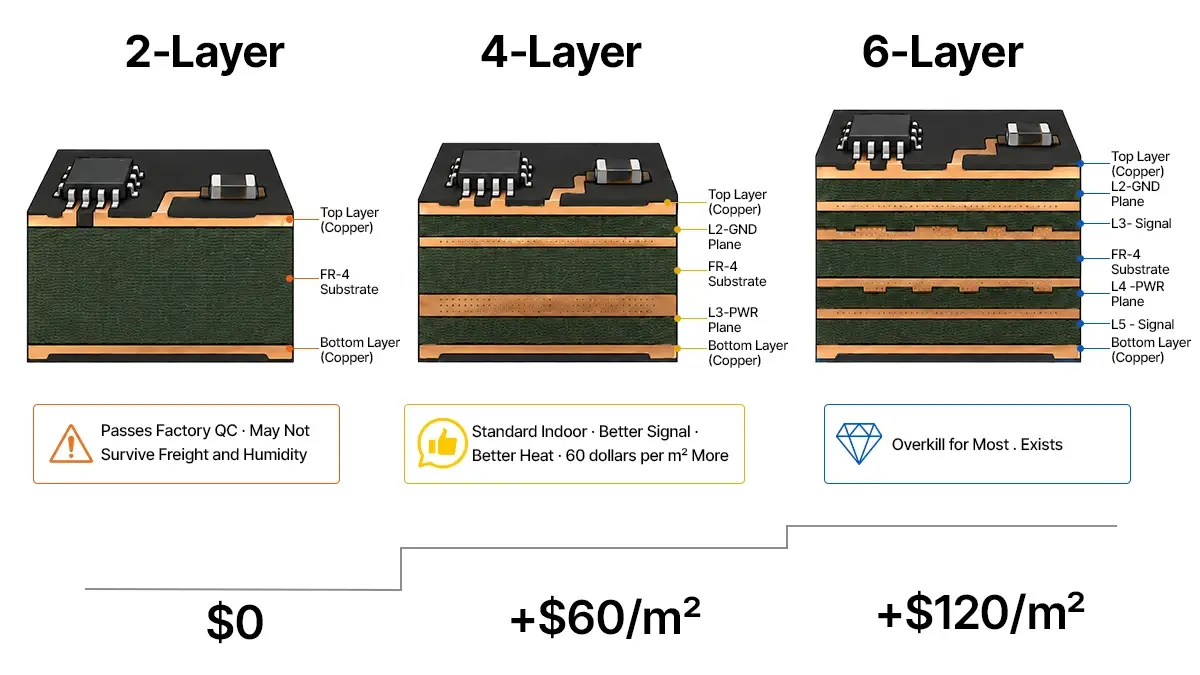
| 3 | PCB layers: 2-layer, 4-layer, or 6-layer | ~$60/m² per layer jump |
| 4 | Power supply: PFC, certifications, wide vs narrow voltage | 45–80% |
| 5 | Cables: national standard, CE/UL certified, copper gauge | 60%+ |
| 6 | Cabinet CNC passes and tolerance | $1.5–2/m² per extra pass |
| 7 | Small parts: screws, magnets, RJ45 — by the thousand | Death by a thousand cuts |
Brand. Wire. Bracket. Three Words That Explain Half the Price Gap.
What the quote says: “SMD2121 LED.” All three quotes say it.
What it actually costs you: SMD2121 is just the package size. It tells you nothing about what’s inside.
Three things decide the real cost:
- Brand. Nationstar. Kinglight. Sinyopto. These are tier-one. There are dozens of tier-three brands you’ve never heard of — and they cost half as much.
- Wire material. Gold wire runs brighter. Lasts longer. Costs 60–80% more than copper wire. Same brand. Same package. Different wire.
- Bracket material. Copper bracket vs iron bracket — another 15–20% gap. Iron bracket LEDs are cheaper. They also oxidize faster. Heat dissipation is worse. Guess what happens in year three.
The $780 quote? Almost certainly copper-wire, iron-bracket LEDs from a brand they won’t name. The first year looks fine. The third year, you’re swapping modules every month.
“Name the LED brand, the wire type, and the bracket material.”
One sentence. If they hesitate, walk.

Why 3,840Hz on a Quote Means Nothing
What the quote says: “Refresh rate: 3,840Hz.” On paper. Every quote.
What it actually costs you: 3,840Hz is what the chip claims in a lab. Your real refresh rate? It depends on three things the quote never mentions:
- IC model. Different driver ICs. Different prices. Some have PWM. Some don’t. That’s a 30–50% cost difference.
- Scan mode. Higher scan = fewer ICs per square meter = lower cost. Also = lower real refresh. A 1/32 scan wall uses half the ICs of a 1/16 scan wall. Half the IC cost. But the refresh rate? Not even close to 3,840Hz.
- IC count per m². The scan mode determines this. More ICs = more cost = more actual refresh capability.
The $780 quote is running high-scan, low-IC-count, no-PWM. Software still reports “3,840Hz.” A DSLR camera will tell you the truth.
“What IC model? What scan mode? How many ICs per square meter?”
Then: “Can I verify the refresh rate with a DSLR at 1/3000 shutter speed?”

2-Layer, 4-Layer, 6-Layer. Your Quote Won’t Say.
What the quote says: Nothing. PCB specs don’t appear on quotes.
What it actually costs you: LED module PCBs come in three grades:
- 2-layer. Works. Survives the factory. May not survive a shipping container, humidity, and two years of thermal cycling.
- 4-layer. Standard for serious indoor installations. Better signal integrity. Better heat dissipation. About $60/m² more than 2-layer.
- 6-layer. Overkill for most projects. But exists.
The $780 quote is 2-layer. It’ll pass factory QC. The question is what happens after six months in a humid coastal city.
“How many PCB layers? Send a cross-section photo.”
A cross-section photo is hard to fake. If they won’t send one, assume 2-layer.
Where Corners Get Cut — Quietly
What the quote says: “Power supply: included.” As if they’re all the same.
What it actually costs you: Power supplies differ by 45–80% in cost. Here’s what you’re not being told:
- PFC or no PFC. Power Factor Correction. Without it, your electricity bill is higher. Your power distribution runs hotter. Most cheap quotes skip PFC.
- Certified or uncertified. CE. UL. TÜV. A certified PSU costs 45–80% more than an uncertified one. For a reason — the certified one passed safety testing.
- Wide voltage or narrow voltage. Wide-voltage PSUs handle 100–240V fluctuations. Narrow ones don’t. In a country with unstable grid power, that matters.
“Does the PSU have PFC? What certifications? Wide voltage or narrow?”
Ask for the certification number. Look it up. “CE compliant” is not the same as CE certified.
If your supplier can’t answer these first 4 — they’re either hiding something or don’t know their own product. Forward your quotes. We’ll show you what’s off. Free.
Copper. Certification. Corners.
What the quote says: “Cables: included.”
What it actually costs you: CE/UL certified cables cost 60%+ more than non-certified ones. Here’s what changes:
- Copper purity and gauge. Thinner copper = higher resistance = heat = signal degradation.
- Insulation rating. Fire-rated jackets cost more. Non-rated ones don’t.
- Connector quality. Gold-plated RJ45 vs nickel-plated. One lasts. One corrodes.
On a 50m² wall, cheap cables might save $200. They might also cause intermittent signal drops for five years.
“Are cables CE/UL certified? Send the certification number and copper gauge specification.”
No number = no certification.
Same Look. Different Cost.
What the quote says: “500×500mm die-cast aluminum cabinet.” Fine.
What it actually costs you: A cabinet isn’t just a frame. It’s a machined part. Tolerance matters:
- Basic die-cast → one or two CNC finishing passes.
- Precision die-cast → three to five CNC passes. Tighter fit. Better module alignment.
- Every extra CNC pass adds $1.5–2 per square meter.
Why does tolerance matter for rental? Modules need to click in and out hundreds of times. Loose tolerance = modules that wiggle after six months of setup and teardown. Tight tolerance = they fit like day one.
“What’s the machining tolerance? Microns. Not millimeters.”
Ask for a tolerance spec sheet from the factory floor. A serious manufacturer has one. A trading company won’t.
Death by a Thousand Cuts
What the quote says: Nothing. Nobody lists screws and magnets on a quote.
What it actually costs you: A single LED cabinet has hundreds of small parts. Across a 50m² wall:
- Screws. Stainless steel vs regular. One rusts after two humid summers. One doesn’t.
- Magnets. Strong vs weak. Weak magnets mean modules that don’t sit flush. Worse on rental walls — modules pop loose during transport.
- RJ45 connectors. Gold-plated contacts vs nickel. Gold lasts. Nickel corrodes.
Each part is cents to a dollar. But a wall has thousands of them. Cumulative difference? Real money. Real reliability gap.
“Are the screws stainless steel? What’s the magnet pull force? Gold-plated RJ45?”
A magnet pull test takes 10 seconds. A magnet that barely holds its own weight won’t hold your module flat after 100 setups.
What Else Gets Quietly Downgraded
The display panel itself is 60–70% of the quote. But here’s what else you’re not being told:
- Packaging. Flight case wheels: good ones vs cheap ones — 30–60% cost gap. Cheap wheels fail during freight. You open the container. Broken case. Broken modules.
- Spare parts. Are spare modules priced at the same rate as the main order? Some suppliers charge 30% extra for spares. You need them. They know you need them.
- Control system. NovaStar vs generic receiving card. One is the industry standard. One works until it doesn’t — and then nobody can troubleshoot it.
Ask for a line-item breakdown. Every single line. If they won’t give it, there’s a reason.
7 Questions to Send Right Now
Copy these. Paste them into an email. Send to every supplier who quoted you.
- LED chip brand, wire type (gold or copper), bracket material (copper or iron)?
- IC driver model, scan mode, IC count per m² — and can I DSLR-verify refresh?
- PCB: 2-layer, 4-layer, or 6-layer? Send cross-section photo.
- PSU: PFC? Certifications (CE/UL/TÜV)? Wide voltage?
- Cables: CE/UL certified? Copper gauge spec?
- Cabinet: machining tolerance in microns?
- Screws stainless steel? Magnet pull force? RJ45 gold-plated?
If a supplier answers all seven clearly, with real numbers — you’re talking to a manufacturer.
If they dodge three or more — you’re looking at a trading company that doesn’t know what’s inside its own product.
Free. No sales pitch. We know where a $780/m² P2.6 panel cuts corners — because we negotiate these decisions every day.
Runs client operations at DOIT VISION, working directly with integrators and project buyers across global markets. Over a decade in the LED display supply chain. From component sourcing to final installation. He knows exactly where cost gets cut — and exactly what it costs the buyer later.
Why do two LED displays with the same pixel pitch cost very different amounts?
What is the difference between gold wire and copper wire LED chips?
Does 3,840Hz refresh rate on a datasheet mean the LED display has true high refresh?
What should I check about the power supply in an LED display quote?
How do I compare LED display quotes from different suppliers?
How important are PCB layers in LED display modules?
What hidden costs should I look for in an LED display quotation?
Discuss your brightness requirements
Tell us what the screen needs to do. We can suggest a Square configuration and confirm the brightness and power details for your quote.
Request a Quote