Retouched indoor LED installation with a connected wall, overhead screen and vertical return displaying blue and pink imagery
HOME › Product › Indoor LED Display
LED video walls for permanent installation

Indoor LED display

Build the right wall for your space. Compare three front-service cabinet systems for reception areas, retail interiors, meeting spaces and auditoriums—then choose the pitch and layout for your content.
Choose your series

Start with the wall you need.

Choose an installation need to highlight a starting point. Compare pitch and brightness below.

Block Series
Slim walls · mixed cabinet sizes

Block Series

The size tool for indoor walls that are not a clean rectangle. Four standard cabinets — 500×250, 750...

Format
Four cabinet sizes
Pitch
P1.25–P3.91
Depth
33 mm
Explore Block Series
Brick Series
Curves · corners · 500 mm width

Brick Series

Brick is the structure tool: a 500 mm indoor SMD cabinet with two sizes, optional GOB, curve kits, a...

Format
500 mm-wide cabinets
Pitch
P1.56–P3.91
Depth
43.7 mm
Explore Brick Series
Standard Indoor 640 by 480 mm SMD cabinet front and rear rendering
Flat walls · one cabinet format

Standard Indoor

Start here for a flat wall built around one 640 × 480 mm format. Five SMD pixel pitches, including P2 and P2.5.

Format
640 × 480 mm
Pitch
P1.25–P2.5
Depth
59 mm
Ask about Standard

All three: front service · NovaStar / Colorlight configurations · 2-year warranty.Final selection depends on your layout and content.

A different display format?

Fine Pitch LEDSmall text and close viewing
All-in-One LEDPackaged meeting-room displays
LED PosterFreestanding signage
Flexible LEDContinuous curves and columns
Side by side

See what changes your choice.

Choose the cabinet system for the installation. Then choose the pixel pitch for the content and audience.

Swipe the table to compare all three series.

Indoor cabinet systems. Dimensions are cabinet dimensions; mounting space is additional.
Compare Block Series Brick Series Standard Indoor
Best starting point Slim or mixed-size layouts Curved walls and corner returns Flat walls using one format
Pixel pitch
P1.25P1.5625P1.953P2.5P2.604P2.976P3.91
P1.56P1.89P2.5P2.604P2.976P3.91
P1.25P1.538P1.86P2P2.5
Cabinet W × H 500 × 250 / 750 × 250 mm
1000 × 250 / 1000 × 500 mm
500 × 250 / 500 × 1000 mm 640 × 480 mm
Cabinet depth 33 mm 43.7 mm 59 mm
LED surface SMD with GOB SMD; GOB optional SMD
Layout options Flat / 90° / dual-side option Flat / curve / 90° Flat
Brightness P1.25 / P1.5625: 600 nits
Other listed pitches: 800 nits
P1.56 / P1.89: 600–800 nits
Other listed pitches: 800–1,000 nits
600 nits
Front / rear protection IP31 / IP31 IP31 / IP31 IP31 / IP31
Average / max. power 100–200 / 350 W/m² 140 / 420 W/m² 100 / 290 W/m²

Plan the complete installation. Add the frame, cable routes and ventilation to the listed cabinet depth. Confirm structural load from the actual cabinet mix.

Compare a like-for-like quotation. Include the processor, mounting, power distribution, spare modules and packing alongside the LED panels.

Same wall · different pixel counts

Size sets the canvas.
Pitch sets the detail.

A 3.2 × 1.92 m Standard Indoor wall uses 20 cabinets in either pitch. The pixel count changes; the physical size stays the same.

Plan your wall
P21,600 × 9601.54 million pixels
P2.51,280 × 7680.98 million pixels

Calculated from 5 × 4 cabinets at 640 × 480 mm. Grids are schematic, not a viewing simulation. Check small text with your actual content.

Built for the space

From a drawing to a working display.

Architectural rendering based on the Shenzhen triple-fold LED installation, showing the wall, canopy underside and front return
Design visualization · View site photos
Block Series · Shenzhen

A wall, a canopy and a return.

This triple-fold reception display uses standard Block cabinets across three connected surfaces. The layout brings the content into the architecture; it also needs an agreed mounting plan and content mapping.

Pixel pitch
P1.953
Display area
38.5 m²
Cabinets
98
See the project

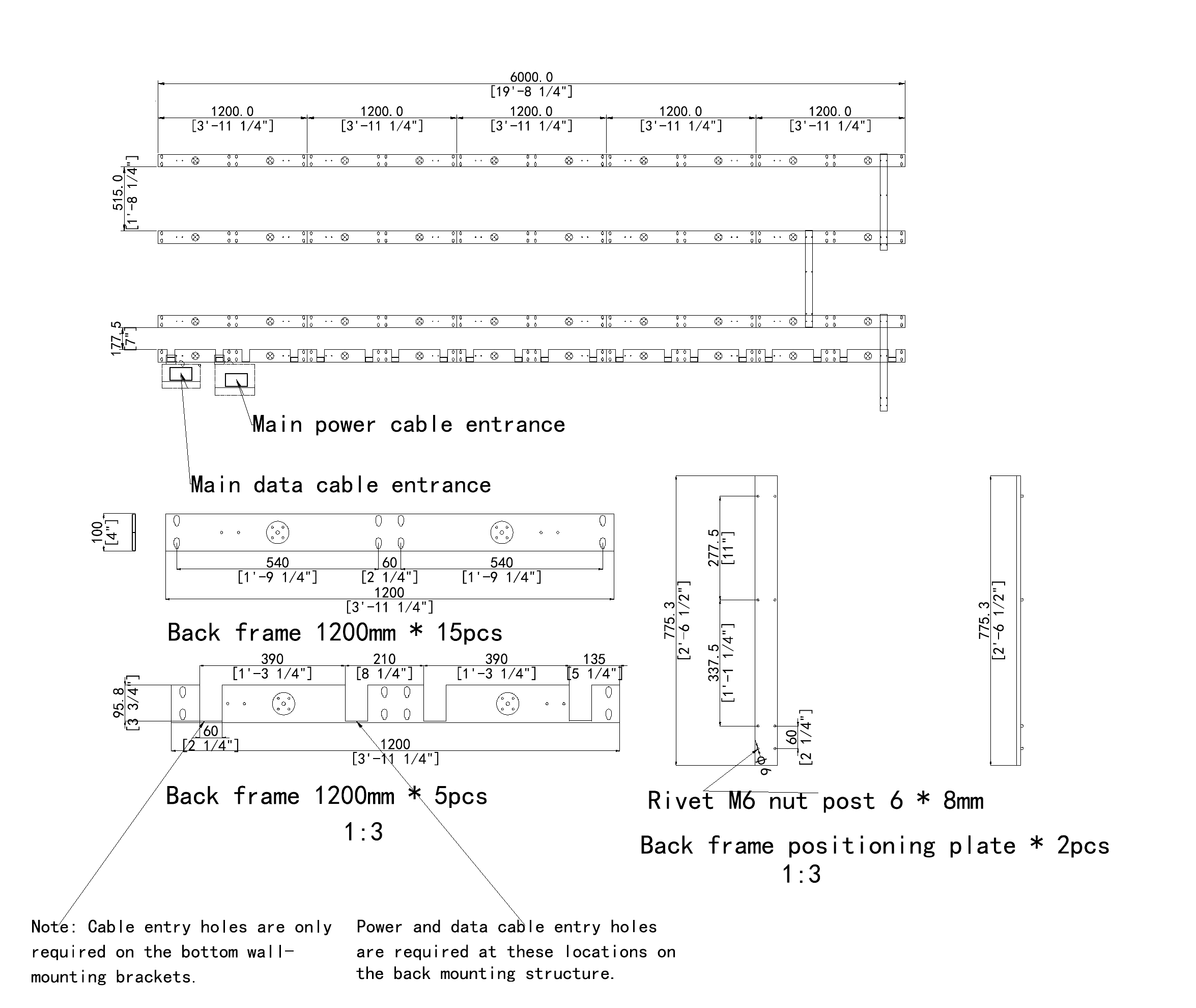
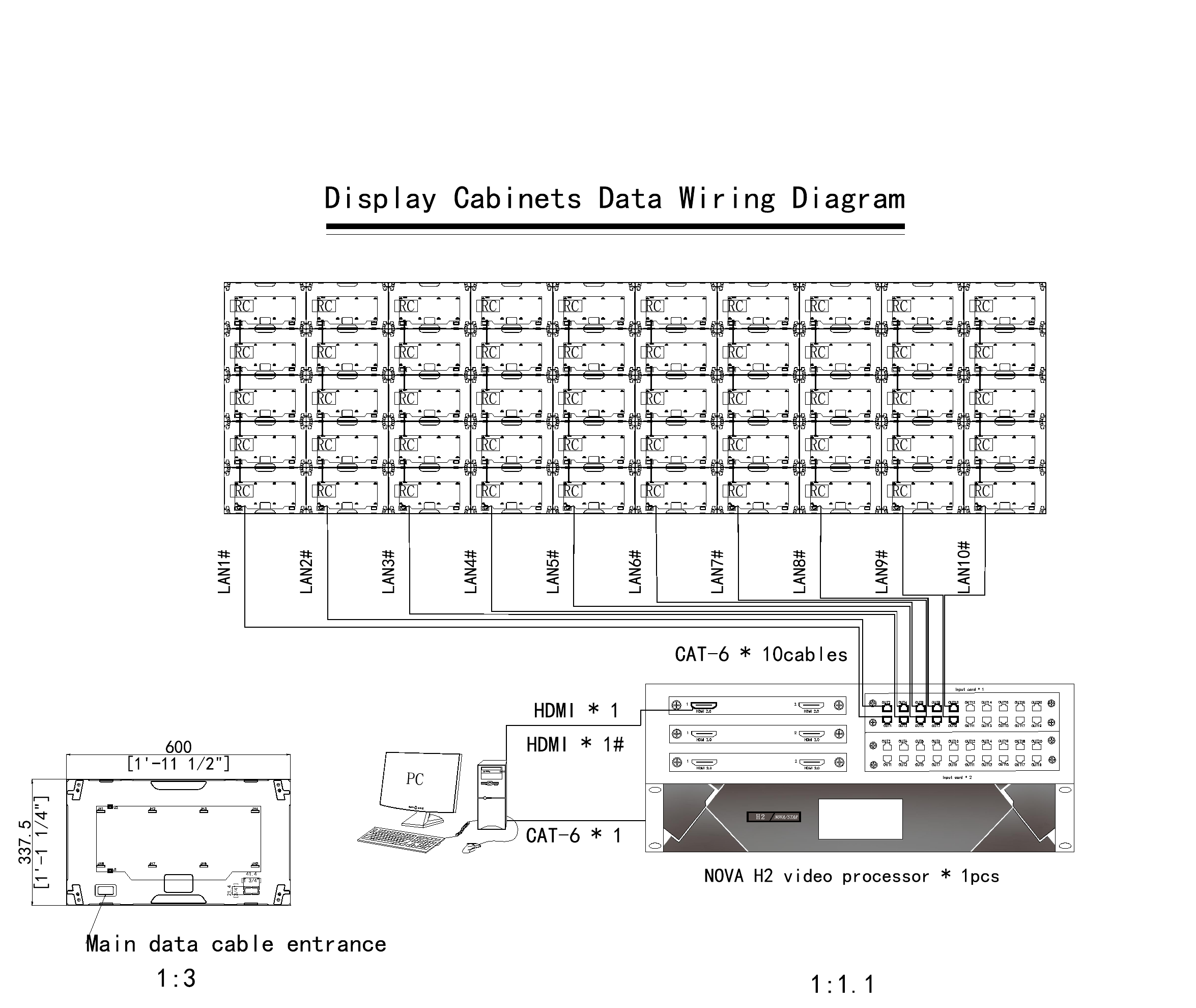
Free drawings & installation support.

Drawings & frame CAD

Free product and mounting-frame drawings, including custom frame CAD design.

Wiring & installation

Wiring diagrams and installation instructions for your installation team.

Hardware & frames

Mounting plates and screws matched to your layout. Custom frames available with your quotation.

Indoor LED mounting-frame CAD drawing showing rail dimensions, positioning plates and cable entry locations

Frame & mounting drawing

Mounting rails, dimensions and cable entries.

View full drawing (opens in a new tab)
Indoor LED signal wiring drawing showing cabinet data routes and video processor connections

Signal wiring diagram

Cabinet routes and processor connections.

View full drawing (opens in a new tab)

Example indoor project drawings. Your drawings are prepared for your screen layout.

Technical selection

Four checks before
you specify.

Bring these details into the conversation before the cabinet list is final.

Content & viewing

Bring a sample slide, menu or video. Check the smallest text from the nearest and furthest normal viewing positions; a logo loop and a spreadsheet place different demands on the same wall.

Light & surface

Check daylight, reflections and the brightness used during normal operation. Where people can reach the screen, compare Block’s standard GOB with Brick’s optional GOB: a protective layer over the LEDs. Confirm cleaning and protection requirements with the selected configuration.

Mounting & maintenance

Send site photos, wall or supporting-structure details and the available mounting depth. We provide free product and frame drawings, including custom frame CAD design. Plan ventilation, cable routes and service access around the complete assembly; cabinet thickness alone is not the finished wall projection.

Processing & handover

Match the processor to the total pixel load, sources and content workflow. For filmed displays, review the camera setup as well. Define spare modules, configuration files and maintenance instructions in the project handover.

Before you order

Indoor LED questions.

Which indoor LED display series should I choose?

Start with the installation drawing. Block suits slim walls and mixed cabinet sizes, with GOB protection as standard. Brick suits projects needing a jointed curve or corner return, with optional GOB. Standard Indoor uses a single 640 × 480 mm cabinet format for flat walls. All three provide front service. Choose pixel pitch separately, using the content, closest viewing position and required screen resolution.

How do I choose pixel pitch for an indoor LED video wall?

Use the nearest regular viewing position, the smallest important text and the total screen dimensions together. A finer pitch puts more pixels into the same area, but viewing distance alone does not guarantee readable content. Check the proposed pixel resolution against your source material and preview it at the intended viewing size. For especially close viewing or dense information, also compare our Fine Pitch range.

Should I choose a modular wall, an All-in-One display or an LED poster?

Choose a modular indoor LED wall when the display must fit a particular width, height or architectural layout. Consider an All-in-One LED display when a packaged screen format fits the meeting room. Consider an LED poster for a freestanding retail or lobby display. These routes address different installation needs; compare available dimensions, the content workflow and the equipment included before requesting a final quotation.

Can these indoor LED panels form curves and corners?

Brick offers curved installation and 90° layouts; Block offers 90° and dual-side configurations. The final cabinet arrangement, joint details and supporting structure need to match the drawing. For a continuous curved surface or round column, compare the Flexible LED range. A corner capability does not define an available bend radius, so send a plan view and the intended dimensions before the layout is confirmed.

Does front service mean the display can sit directly against the wall?

Front service allows maintenance from the viewing side, but cabinet depth is only one part of the installed depth. The mounting frame, alignment adjustments, cable routes and ventilation still need space. Confirm access to modules, power supplies and receiving cards for the selected configuration. Send the wall construction and section drawing so the installation plan can account for the complete display system and future maintenance.

What changes the price of an indoor LED screen?

Pixel pitch, display area, cabinet layout, surface protection and the processing system all affect the quotation. Installation structure, spare modules, power distribution, packing and delivery also need to be defined. Compare offers using the same screen dimensions and required resolution, with the included equipment clearly listed. Share a budget range and intended content so we can compare suitable configurations without assuming that the finest pitch is necessary.

How much brightness and power should I plan for?

Evaluate brightness against the actual room lighting and reflections. The listed indoor configurations span 600 to 1,000 nits, depending on series and pitch; a window-facing installation needs a separate daylight review. Use the selected model’s maximum power figure for the electrical design, then account for processors and other equipment. Average figures vary with content and settings, and do not replace a project-specific electrical schedule.

What installation drawings and accessories do you provide?

DOIT VISION provides free product and mounting-frame drawings for indoor LED projects, including custom frame CAD design for specific installation requirements. We also provide wiring diagrams, installation instructions and mounting accessories such as plates and screws to suit the agreed layout. Custom mounting frames can be supplied as part of the quoted package. Send screen dimensions, site photos and wall or supporting-structure details so we can plan the installation with you.

Further reading

Work through the details.

How to Choose LED Pixel Pitch: P0.9, P1.2, P1.5, P1.8, P2, P2.5 1
Blogs

How to Choose LED Pixel Pitch: P0.9, P1.2, P1.5, P1.8, P2, P2.5

Contents 01 — Why Pixel Pitch Is the Wrong Starting Point 02 — The Viewing Distance Formula 03 — Pix...

Read guide
All-in-One LED display front and rear product views with optional mobile stands
Guide

All-in-One COB LED TV

A wall-mounted COB LED display for meeting rooms and large-screen home theaters. Choose 108, 135 or ...

Read guide
Your indoor project

Send the space.
We’ll work through the screen.

Send site photos, a dimensioned wall drawing and sample content. We’ll help select the screen and prepare free product and mounting-frame drawings.

info@doitvision.com
Wall & installation
Screen width × height, flat or shaped, available mounting depth
People & content
Nearest viewer, sample content, cameras
Site & connections
Site photos, wall/support details, power and signal locations, service access
Budget & delivery
Budget range, destination and required date
Bring us the brief

Start your project.

A drawing, a site photo or an early idea. Tell us what you are planning and work through the details with our engineering team.

We use these details to respond to your project. Privacy notice.

Manufacturer
DOIT VISION
Founded
2013, Shenzhen, China
Headquarters
Shenzhen, Guangdong, China
Certifications
CE, FCC, RoHS, CB, ISO 9001
Official Website
https://www.doitvision.com/