 All-in-One COB LED TV
  Flexible LED Displays
  Transparent LED Displays
  Led Poster
  Circular LED Displays
  Creative & Custom LED Displays
 Many people often ask: how do you calculate how many control cards are needed for a LED display screen? How do you accurately estimate the cost? And how can you fully utilize each sending and receiving card? Today, Doitvision will provide a comprehensive explanation on LED display loading solutions.
Related:
If you want to calculate the size of your LED display wall, you can refer to our LED wall calculator.
Sending Card Configuration:
Currently, the commonly used LED sending cards on the market typically have 2 Ethernet output ports. Each port can load 650,000 pixels, and a single card can load up to 1.3 million pixels, such as a resolution of 1280×1024 at 60Hz.
In contrast, NovaStar’s 600 Series sending cards have 4 Ethernet output ports, and support a maximum load of 2.3 million pixels, such as 1920×1200 at 60Hz or 2560×960 at 60Hz.

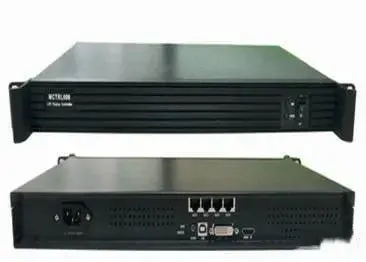
When determining the LED sending card configuration for LED screen, there are two key checks to consider:
- Calculation:
- Dimension check.
Calculation
You should first calculate the total number of pixels on the LED screen.
If the total pixels do not exceed 1.3 million, you can use 300 series sending card.
If the pixels exceed 1.3 million but not 2.3 million, then use 600 series sending card.
Dimension Check

Please check whether the screen’s pixel width or height exceeds DVI limits.
Generally, a single DVI output supports up to 2560 pixels in width and 1200 pixels in height.
If the screen is larger than that, You should need a video processor (splicer) to divide the image.
Examples:
Example 1: Screen resolution 1280×1024
Calculation: Total pixels = 1280 × 1024 = 1.3 million → A single MSD300 can handle it.
Dimension Check: Width and height are within DVI limits → one DVI port is enough.
Example 2: Screen resolution 2880×384
Calculation: Total pixels = 1.1 million → One MSD300 seems sufficient.
Dimension Check: Width exceeds DVI limit (2560) → Requires 2 DVI outputs, thus 2 MSD300 cards are needed.
Loading solution:

Example 3: Screen resolution 2560×960
Calculation: Total pixels = 2.45 million → Exceeds 1.3M but within 2.3M → One MCTRL600 is sufficient.
Dimension Check: Within DVI limit → One DVI output is enough.
Loading solution:

Example 4: Screen resolution 3840×2400
Calculation: Total pixels = 9.22 million → 9.22 ÷ 2.3 ≈ 4 → Needs 4 MCTRL600 sending cards.
Dimension Check: Both width and height exceed DVI limits, but can be split into four 1920×1200 segments using a splicer.
Loading solution:

Receiving Card Configuration:
In general, receiving card loading methods can be categorized into standard and split loading.
As a rule of thumb, We always maximize the number of hub interfaces. It means it’s preferable to load more pixels in height than width, since height doesn’t affect refresh rate as much.

Let’s take the following LED module specs as an example:
Driver chip: Generic
Receiving card: MRV330

Method 1: Standard Loading
Loading size: 128 × 384
Refresh rate: 1920Hz
Gray level: 4096 (normal brightness) / 16384 (low brightness)
Module layout: 2 × 12

Method 2: Split (Symmetrical) Loading

Loading size: 256 × 192
Refresh rate: 1920Hz
Gray level: 4096 (normal brightness) / 16384 (low brightness)
Module layout: 4 × 6

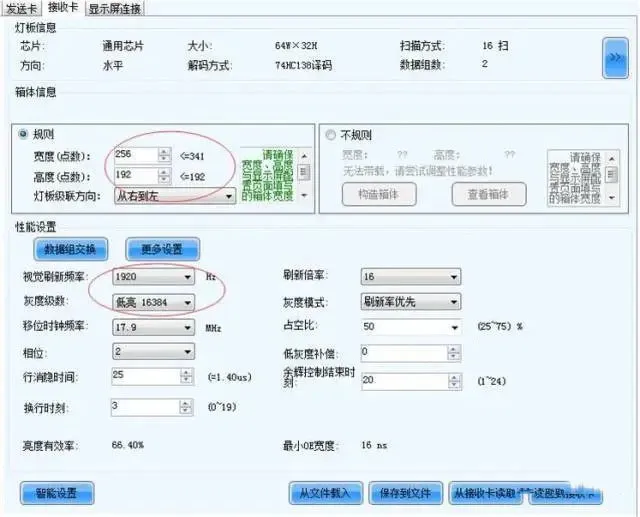
Conclusion:
We hope this guide help you choose the most cost-effective and technically LED conrol configuration when using NovaStar controllers. Let us know if you’d need help with a custom configuration for your project.