 All-in-One COB LED TV
  Flexible LED Displays
  Transparent LED Displays
  Led Poster
  Circular LED Displays
  Creative & Custom LED Displays
 If you’ve spent any time in the LED display industry, you know flat cables are the unsung heroes of every setup. They’re small, thin, and easy to overlook, but pick the wrong one, and your whole screen can go haywire: glitches, signal drops, even complete blackouts mid-event.
I’ve seen it happen more times than I’d like: a client skimps on cables to save a few bucks, only to shell out way more later fixing avoidable issues. Today, we will guide you know about LED display flat cables.
What Is an LED Display Flat Cable?

Let’s start with the basics. When we talk about “flat cables” in the LED world, we’re referring to the wires that carry display data between key components. It is usually between receiver cards and unit boards, or between unit boards themselves. Think of them as the “nervous system” of your LED screen. they transmit the control system’s commands to every pixel.
The vast majority of these cables follow the UL2651 standard. You’ll hear them called “UL2651 gray flat cables” or “UL2651 colored flat cables”:
Pitch Size:

This is the distance between the center of one wire and the next. The most common options are 1.27mm, 2.0mm, and 2.54mm. For most LED displays , 1.27mm is the go-to. it’s compact enough to fit tight spaces without sacrificing signal quality.
Conductors:
The “core” of the cable, made from materials like aluminum-magnesium wire, tinned copper, or bare copper. They can be single-strand or multi-strand . The gauge ranges from 26 AWG to 16 AWG .
Outer Jacket:
It is made from PVC , this layer protects the conductors. It’s rated to handle temperatures up to 105°C ,so it won’t melt in hot environments and voltages up to 300V.
Key Traits:
These cables are flexible ,you can bend and twist them without breaking. They are acid-resistant , oil-resistant , moisture-proof, and mold-proof .
Why Flat Cables Beat Other Wiring Options
You might wonder: why not just use regular round wires? Flat cables have four big advantages :
Compact Design:
They’re thin and lightweight. It is important if you’re building a slim LED cabinet or a portable rental screen. Regular wires take up more space and add unnecessary weight, which can limit where you install your screen.
Flexibility:
Unlike stiff round wires, flat cables can bend, twist, and even fold without damaging the conductors.
Reliable Performance:
In particular Gray UL2651 cables have top-tier electrical and dielectric properties. They minimize signal interference, so your screen stays crisp even in noisy environments .
Easier Assembly:
Flat cables line up perfectly with LED components, so you don’t have to waste time sorting through messy wires.
The Other Half of the Equation: Flat Cable Connectors
A great cable is only as good as its connector. We call these “FC connectors” or “IDC connectors” .
Note:
IDC stands for “insulation displacement contact”
Here’s what you need to know about them:
Pin Counts:
They come in sizes from 10-pin (10P) up to 64-pin (64P). The number you need depends on your LED components. For example, a small unit board might use a 16P connector, while a high-resolution board could need a 30P or 40P.
Material:
They’re made from insulating synthetic rubber polymers. This material is durable, heat-resistant, and won’t crack from repeated use.
How to Crimp IDC Gray Flat Cables (6 Common Methods)
Once you have your cable and connector, you need to “crimp” them together . There are six standard ways to do this, and the right one depends on how your LED components are oriented.
Same Direction, Matching Bumps (Most Common):

Both IDC connectors face the same way, and their small raised “bumps” (where the pins make contact) line up. We call this “one-to-one crimping” because the pins on the connector match the wires in the cable exactly. About 85% of clients use this method. it’s straightforward and works for most setups.
Same Direction, Opposite Bumps:
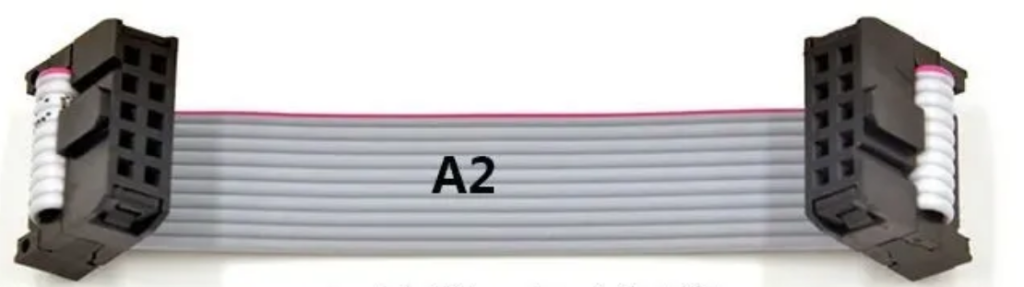
Connectors face the same way, but their bumps point away from each other. Use this if your components have pinouts that are reversed on one side.
Same Direction, Facing Bumps:
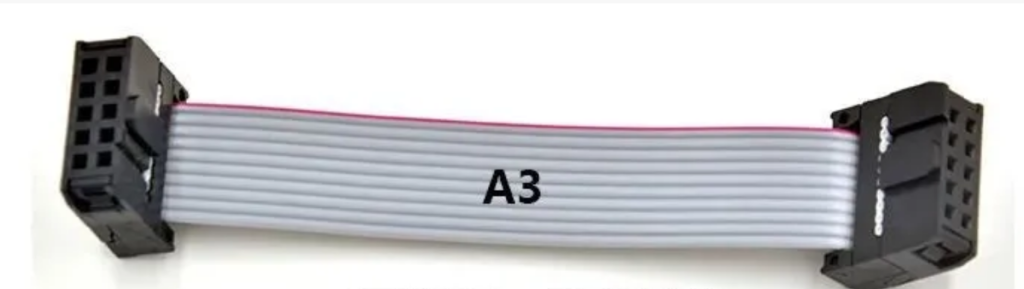
Connectors face the same way, and their bumps point toward each other. This is rare, but useful for tight spaces .
Opposite Directions, Matching Bumps:

Connectors face opposite ways , such as one up, one down, but their bumps line up. It is Great for application, such as components are flipped relative to each other.
Opposite Directions, Opposite Bumps:
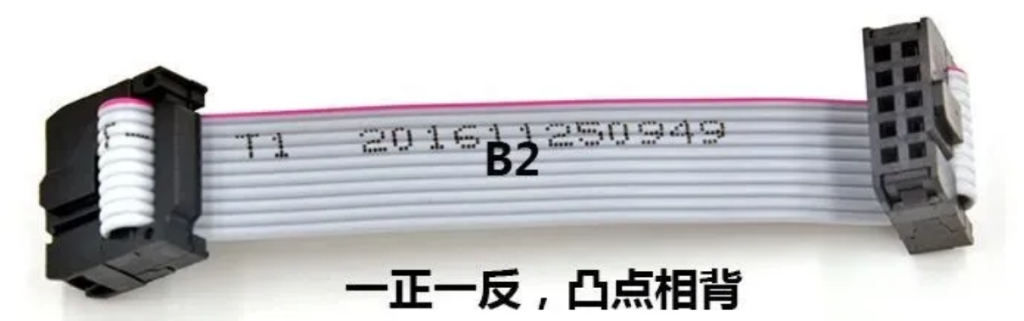
Connectors face opposite ways, and their bumps point away from each other. Think of this as the “reverse” of the first method. You can use it if both your components and pinouts are reversed.
Opposite Directions, Facing Bumps:

Connectors face opposite ways, and their bumps point toward each other. This is the least common, but it works for very specific custom setups.
Pro tip:
Please always test the crimp before installing the screen. A loose connection will cause signal issues later.
What Ruins a Flat Cable? (3 Common Issues)
A flat cable fails when either the cable itself, the connector, or their bond is faulty. Here are the three biggest culprits I’ve seen:
Broken or Damaged Cable Core:
This happens when the conductor gets frayed or cut during manufacturing. Cheap cables often have this problem. LED manufacturers skip quality checks to save money. A broken core means spotty signal or no signal at all.
Misaligned Connector Teeth:
The tiny teeth inside the IDC connector need to line up perfectly with the cable’s wires. If the teeth are bent or shifted , they won’t pierce the jacket properly, so the connector and cable never make a solid contact.
Bad Crimp Alignment:
Even if the cable and connector are good, a misaligned crimp will break the connection. This usually happens when someone uses a cheap crimping tool or rushes the job.
The Big Decision: Which Conductor Material to Choose?

The material of the cable’s conductor is the single most important factor in how well it works. There are three main options: aluminum-magnesium, tinned copper, and bare copper. Let’s compare them.
Aluminum-Magnesium Flat Cables:
These cables use aluminum-magnesium alloy wires as conductors. It is mostly aluminum, with a small amount of magnesium (1-3%) to make them stronger.
Pros:
- Cheap: Great if you’re on a tight budget.
- Lightweight: About 1/3 the density of copper, so they don’t add extra weight to your screen.
- Corrosion-resistant: Holds up well in damp or slightly dusty environments.
- Good heat dissipation: Doesn’t overheat during long use.
Cons:
- Signal loss over distance: Use them only for cables shorter than 1.5 meters. Go longer, and you’ll see attenuation.
- Low bending life: Bend them 180° more than 5,000 times, and they’ll break.
- It is Not for rental screens that get folded or moved often.
- Higher resistivity: 2.8μΩ・cm (1.6x more than copper), so it’s not great for high-data setups (like 4K small-pitch screens).
- Best For: Fixed installations, under 1.5 meters, budget is the top priority.
Tinned Copper Flat Cables:
These are the industry standard. They start with oxygen-free copper wires and get a thin layer of tin via hot tinning. That tin coating is a game-changer.
Pros:
- No oxidation: Tin stops the copper from rusting, even in humid or salty air ,like coastal outdoor screens.
- Passes 24-hour salt spray tests without turning black.
- Great signal quality: Resistivity of 1.7μΩ・cm so no signal loss even for long runs over 1.5 meters.
- Flexible: Breaks only after ≥30% elongation.It is perfect for rental screens that get bent or packed.
- Long lifespan: 5-8 years (2-3x longer than aluminum-magnesium).
- Interference-resistan): Blocks noise from other electronics.
Cons:
- Higher cost: 20-40% more expensive than aluminum-magnesium. But the long lifespan means it’s cheaper in the long run .
- Best For:
- Almost everything application,like rental screens, outdoor displays, small-pitch screens, high-data setups It’s the “set-it-and-forget-it” option.
Bare Copper Flat Cables:
These are made by coating brass wires with a thin layer of oxygen-free copper. They’re rare today.
Pros:
- None worth mentioning.
- They’re slightly cheaper than tinned copper, but the trade-offs are brutal.
Cons:
- Terrible signal quality: Brass has high resistivity , so you’ll get constant signal drops.
- Fast oxidation: Rusts in 6 months at room temperature,leading to communication failures .
- Brittle: Harder than other options, so it breaks easily when bent.
- Best For: Nothing. I haven’t seen a reputable LED display manufacturer use these in years. Only old, outdated setups. Save yourself the trouble and avoid them.
Final Thoughts:
Flat cables might be small, but they’re the backbone of your LED display. I’ve seen clients spend tens of thousands on a high-end screen, only to use cheap aluminum-magnesium cables for long runs, and then panic when the screen glitches during a big event.
Here’s my golden rule: If the project matters , go with tinned copper. The extra 20-40% cost is nothing compared to the headache of fixing a failed cable mid-event, or replacing the entire cable setup a year later.
If you’re still unsure, you can talk to us. Doitvision won’t just sell you the most expensive option,they’ll ask about your setup and recommend the right cable for your needs. We hope your LED screen will work smoothly for years to come.