 All-in-One COB LED TV
  Flexible LED Displays
  Transparent LED Displays
  Led Poster
  Circular LED Displays
  Column LED Screens
  Creative & Custom LED Displays
 If you’ve ever wondered what makes an LED screen tick. Why some look crisp in photos while others flicker, or why some show smooth colors while others have uneven brightness. The answer often comes down to one tiny component: the driver IC. These little chips are the unsung heroes of LED displays, controlling everything from how bright each bead shines to how smoothly videos play.
LED modules are packed with different chips. Control chips process video data, power management chips regulate voltage, and driver chips handle the LEDs themselves. But driver ICs are the real workhorses. They act like traffic controllers for the LED beads, adjusting current to set brightness, managing color accuracy. Without a good driver IC, even the best LEDs will look dull, flickery, or uneven.
Today, we will guide you the three main types of driver ICs used in LED screens: general-purpose, dual-latch, and PWM chips.
Key Terms: Refresh Rate, Frame Rate, and Grayscale
Before diving into the chips, let’s demystify three concepts that pop up a lot when talking about LED performance:
- Refresh Rate: This is how many times a single LED bead turns on and off in one second. Higher refresh rates mean better photos and videos. No annoying “stripe” effects when you take a picture. But here’s the catch: every on-off cycle wears out the LED a little. So higher isn’t always better. You just need enough to avoid flicker.
- Frame Rate: This is how many full images the screen shows per second. Thanks to the human eye’s “persistence of vision,” anything over 24 frames per second (fps) looks smooth. Most screens today use 60fps, which feels seamless for videos and games.
- Grayscale: This refers to the number of brightness levels between black and the screen’s maximum brightness. For example, a 14-bit grayscale screen has 16,384 levels (2¹⁴). More grayscale means smoother transitions. No harsh jumps between dark and light. A sunset scene, for instance, will look natural instead of blocky.
General-Purpose Driver ICs:
General-purpose driver ICs are the most common type you’ll find in entry-level LED screens. They’re designed specifically for LEDs, with two key features: they can handle high currents, and they provide “constant current. Each LED gets a steady flow of electricity, even if the power supply fluctuates.
How They Work
These chips act like a steady hand for your LEDs. They take signals from the screen’s controller, convert them into current adjustments, and make sure each LED bead gets exactly the current it needs to shine at the right brightness.
This consistency keeps the screen looking uniform. No random bright or dim spots.
Manufacturers often add extra features to fit specific needs. Some have current “gain adjustment” , while others include “pixel checking” .
The Downsides
For all their reliability, general-purpose ICs have limits. Here’s where they fall short:
“Ghosting” and “Caterpillar Effects”: Ever seen faint, leftover images on a screen or wavy lines in videos ? These happen because general-purpose ICs process data slowly, leaving tiny delays between when one frame ends and the next starts.
Low Refresh Issues:
Their refresh rates top out lower than other chips, which causes flicker in photos or videos. It is annoying for live events or retail displays.
Color and Contrast Problems:
They struggle with low grayscale levels, making dark scenes look muddy or bright scenes washed out. Colors can also look off, with tints of red or blue throwing off accuracy.
Best For
General-purpose ICs are great for budget screens: small indoor signs, basic info displays in offices, or temporary event screens . They’re cheap, reliable, and get the job done. It just don’t expect movie-theater quality.
Dual-Latch Driver ICs:

Dual-latch ICs were built to solve one big problem with general-purpose chips: low “brightness efficiency.” Let’s break that down: general-purpose ICs have only one “buffer” . When they’re showing dark scenes , they have to wait for new data to load before updating the screen.
This delay wastes time, so the LEDs spend less time actually shining. It makes the screen dimmer than it should be.
How They Work
Dual-latch ICs add a second buffer. One buffer holds the current frame’s data ,so the screen keeps showing it, while the other buffer loads the next frame’s data in the background.
This way, there’s no waiting. When the next frame is ready, the chip switches instantly. Suddenly, the LEDs spend more time lit up, boosting brightness efficiency by up to 30%.
This upgrade also improves refresh rates and adds “blanking” . For screens that need to be bright. It is like outdoor signs or stadium displays.
The Catch
While dual-latch ICs fix brightness and smoothness, they flop when it comes to photography. Their refresh rates are high enough for the human eye, but not for camera sensors. Take a photo, and you’ll still get those annoying stripes or flicker. They also don’t improve grayscale much. The dark scenes still is lack detail compared to higher-end chips.
Best For
Dual-latch ICs shine in bright, high-visibility spaces where photos aren’t a priority: outdoor billboards, stadium scoreboards, or factory floor displays. They’re more expensive than general-purpose chips but cheaper than PWM options. Therefore, They are a sweet spot for mid-range screens that need brightness over photo-perfect quality.
PWM Driver ICs:

PWM (Pulse Width Modulation) ICs are the top of the line. They’re built with a RAM module that can handle 16-bit grayscale data. The way is more than the other two types.
This extra memory lets them do something clever: instead of dimming LEDs by reducing current, they flash the LEDs on and off really fast. The human eye sees this as a steady brightness, but the quick pulses let them hit super high refresh rates.
How They Work
Here’s the magic: PWM ICs split each frame’s brightness data into tiny, equal time slices. For example, to show a dim pixel, they might turn the LED on for 1 out of 10 slices; for a bright pixel, 9 out of 10. This keeps grayscale accuracy , while cranking up the refresh rate to 3,840Hz or higher.
They also use “ping-pong buffering”: one part of the RAM loads the next frame while the other plays the current one, so there’s zero lag. And they can handle more LEDs per chip, which simplifies wiring in large screens.
The Trade-Offs
All this tech comes at a cost. PWM ICs are about 4 times bigger than dual-latch or general-purpose chips thanks to that RAM, and they’re significantly more expensive. Sometimes double the price. They also add a tiny delay to the display, because they need time to buffer the data. For most uses, this delay is unnoticeable, but it can be a problem in super time-sensitive setups .
Best For
PWM ICs are worth the splurge for screens: live event stages, broadcast studios, high-end retail displays, or anywhere people will take photos or videos. They deliver flicker-free photos, smooth grayscale, and vibrant colors.
Who Makes These ICs? A Quick Look at the Market
The LED driver IC market used to be dominated by big international names, but that’s changing fast. Here’s who’s leading the pack:
Mainland Chinese Brands: Companies like Chipone(集创北方), Sunmoon (日月成), and Silan (士兰微) are killing it with affordable, reliable chips. They’ve mastered cost control and manufacturing, so their ICs offer solid performance at low prices. They are perfect for general-purpose and mid-range dual-latch chips.
Taiwanese Brands: Macroblock (聚积科技) and Ming Yang (明阳) are big in high-end chips, especially PWM models. They’ve got decades of R&D under their belts, with patents that make their ICs ultra-reliable for professional screens.
Legacy International Brands: Texas Instruments and Toshiba were early players, but they’re losing ground. Their chips are well-made, but they can’t compete with Chinese brands on price, and Taiwanese brands outperform them in high-end tech.
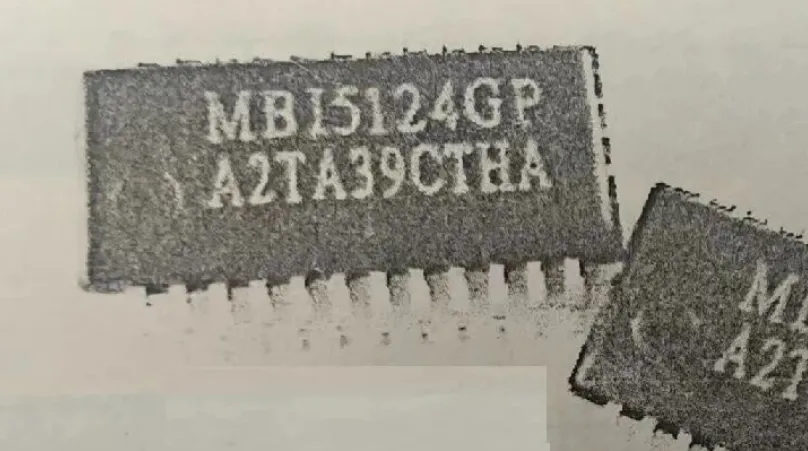
Common models you might see: Chipone’s JD9325 , Macroblock’s MBI5124 , and Silan’s SL2336 .
How to Find Your Screen’s IC and Decoder Chips (Useful for Setup!)

If you’re installing or troubleshooting an LED screen, you’ll need to know which ICs and decoder chips it uses. This info helps the controller software sync with the hardware. Here’s how to find them:
Check the Module Label:
Most LED modules have a sticker or silk-screened text listing the IC model (like LS9931) and decoder chip (like DP32020). It’s usually near the edge of the module, close to the input ports.
Peel Back the Cover:
If the label’s missing, gently lift the module’s plastic cover . Use a flathead screwdriver, but be careful not to damage the LEDs. The ICs are the small black squares on the circuit board. Their model numbers are printed on top.
Ask the display Manufacturer:
If all else fails, the screen or module maker should have a spec sheet with the chip info.
Wrapping Up:
At the end of the day, the best driver IC depends on what you need your screen to do.On a budget, need basic functionality? Go with general-purpose ICs. They’re cheap, reliable, and work for simple displays. Need brightness for outdoor or large spaces, but don’t care about photos? Dual-latch ICs balance performance and cost. Want pro-level quality and flicker-free photos, smooth videos, rich colors? PWM ICs are worth the investment.
Understanding these chips helps you avoid overspending on features you don’t need. Next time you’re shopping for an LED display, ask about the driver ICs .You’ll be surprised how much difference they make. Happy displaying!