 All-in-One COB LED TV
  Flexible LED Displays
  Transparent LED Displays
  Led Poster
  Circular LED Displays
  Column LED Screens
  Creative & Custom LED Displays
 Step 1: As shown in the figure below, identify the positioning points. Assemble the stage support steel structure sequentially on the ground and secure it firmly to the floor.


Step 2: Use square tubes as horizontal bracing between the eight sets of main support steel structures to reinforce the framework.


Step 3: Weld access stairs for ascending and descending to the bottom of the stage support steel structure.

Step 4: Construct the stage platform on top of the support steel structure. Leave openings for stage access and install protective railings around these openings.

Step 5: Locate the center point of the circular stage. Install the module mounting steel frames at positions corresponding to a radius of 5.032 meters. Connect the frames sequentially using the bottom fixing steel plates.


Step 6: Use a laser measuring tool to perform precise positioning adjustments for the steel frames arranged in a circle.

This ensures proper alignment and seam quality between the first and the last modules. As shown below, each individual steel frame can be finely adjusted vertically/horizontally for accurate positioning.
Step 7: Secure the joints of the bottom steel plates using connecting plates.

Step 8: As shown in the figure below, fix the top steel plates sequentially onto the module mounting steel frames.


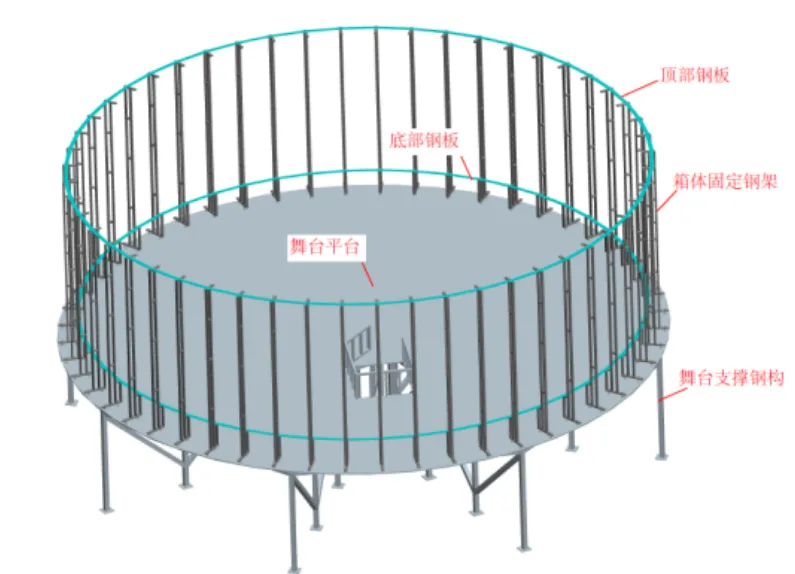
Secure the joints of the top steel plates using connecting plates.
Step 9: As shown in the figure below, install the modules onto the bottom steel plates. Secure them using custom-molded connecting plates.

Step 10: When installing the second, third, and subsequent modules, insert a 0.1mm thick steel shim between them to ensure uniform gaps. Remove the shim after adjustment is complete.
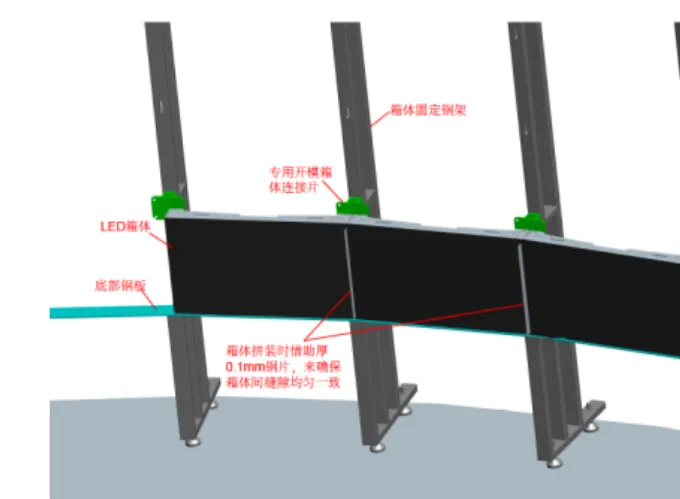
Step 11: Following the previous installation steps, install the first layer of modules sequentially.


For the installation of the first and the last module in the layer, fine-tune the relevant section of the mounting steel frame or the entire frame based on the actual on-site conditions to ensure proper module gaps.
Step 12: Following the previous installation steps, install the second layer of modules.

Step 13: Following the previous installation steps, install the subsequent upper layers of modules sequentially.
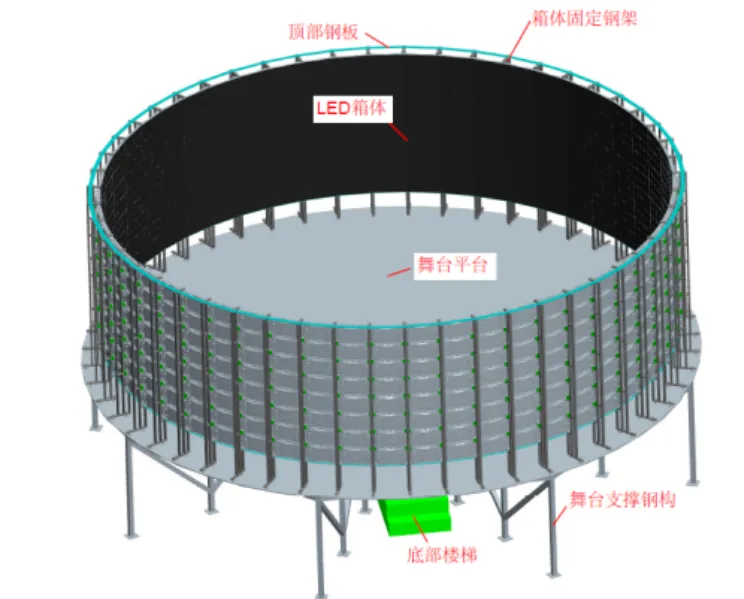
Step 14: Apply decorative trim around the perimeter of the display screen.
